View Patterns
CascadeUI ships seven pre-built view patterns -- Menu, Form, Wizard, Tab,
Paginated, Leaderboard, and Roles. The first five have V1 (StatefulView-based)
and V2 (StatefulLayoutView-based) variants; Leaderboard and Roles are
V2-only. The patterns handle navigation, validation, and content rebuilding
internally; subclasses define content and hooks.
All patterns follow the same customization grammar:
- Class-attribute triples (
*_button_label,*_button_emoji,*_button_style) control the appearance of built-in buttons. - Method hooks (
on_finish,on_submit,on_tab_switched,on_page_changed,on_category_selected) run at lifecycle points. Override to customize behavior. _build_extra_items()is a hook called once during init to register components that persist across content changes. The V1 menu is the exception: it rebuilds its buttons, and calls the hook again on every rebuild.
Every pattern renders its own first message, so await view.send() is the
whole call. A V2 pattern is its component tree and needs nothing further,
and its send() takes no embed or content at all. A V1 pattern's content
is an embed, and each one supplies its own; pass embed= or content= there
to override what the pattern would have built:
class SetupWizard(WizardView):   # V1: content is an embed
    ...

view = SetupWizard(interaction=interaction, steps=steps)

await view.send()                       # the wizard's own first step
# ...or override it:
await view.send(embed=discord.Embed(title="Welcome"))
MenuView / MenuLayoutView
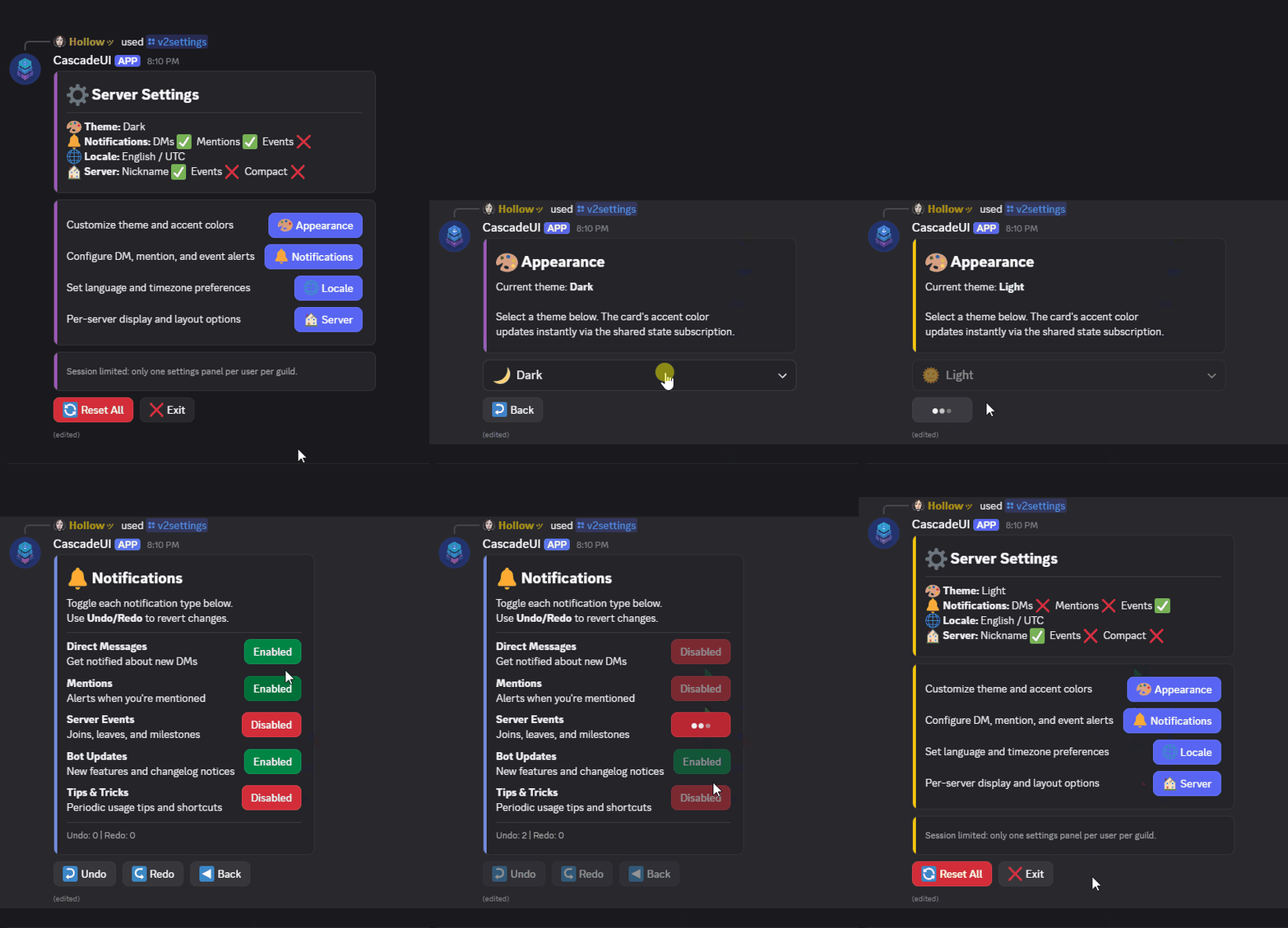
Category-based navigation hub with push/pop drill-down. Each category
generates a button (V1) or action_section() (V2) that pushes to a
target view class. The pattern eliminates the repetitive go_* callback
methods that every hub view would otherwise need.
Category Definitions
Categories are passed as a list of dicts to the categories constructor
parameter:
from cascadeui import MenuLayoutView, card, key_value
from discord.ui import TextDisplay

class SettingsMenu(MenuLayoutView):
    instance_limit = 1
    instance_scope = "user_guild"

    def __init__(self, *args, **kwargs):
        categories = [
            {
                "label": "Appearance",
                "emoji": "\N{ARTIST PALETTE}",
                "description": "Customize theme and accent colors",
                "view": AppearanceView,
            },
            {
                "label": "Notifications",
                "emoji": "\N{BELL}",
                "description": "Configure DM, mention, and event alerts",
                "view": NotificationsView,
            },
            {
                "label": "Locale",
                "emoji": "\N{GLOBE WITH MERIDIANS}",
                "description": "Set language and timezone preferences",
                "view": LocaleView,
            },
            {
                "label": "Server",
                "emoji": "\N{HOUSE BUILDING}",
                "description": "Per-server display and layout options",
                "view": GuildPrefsView,
            },
        ]
        super().__init__(*args, categories=categories, **kwargs)

    def build_header(self):
        return [card(
            "## \N{GEAR}\N{VARIATION SELECTOR-16} Server Settings",
            key_value(self._get_summary()),
        )]
from cascadeui import MenuView
import discord

class SettingsMenu(MenuView):
    instance_limit = 1
    instance_scope = "user_guild"

    def __init__(self, *args, **kwargs):
        categories = [
            {"label": "Appearance", "emoji": "\N{ARTIST PALETTE}",
             "view": AppearanceView},
            {"label": "Notifications", "emoji": "\N{BELL}",
             "view": NotificationsView},
        ]
        super().__init__(*args, categories=categories, **kwargs)

    def build_embed(self):
        return discord.Embed(title="Settings", description="Choose a category.")
| Category Key | Required | Description |
|---|---|---|
label |
Yes | Button label |
view |
Yes | View class to push to |
emoji |
No | Button/section emoji |
description |
No | V2 only: text displayed in the action_section. Without one, the label renders as the section text |
style |
No | Per-category ButtonStyle override (falls back to menu_style) |
rebuild |
No | Per-category rebuild callable for push(rebuild=...) |
Cross-version categories are rejected at construction
A category whose "view" is the other component version raises
TypeError when the menu is constructed: a V1 MenuView cannot list a
StatefulLayoutView-based destination, and a V2 MenuLayoutView cannot
list a StatefulView-based one. push() rejects the same mismatch on
click (see
V1 and V2 Views Cannot Push/Pop Between Each Other),
so validating the category list up front keeps the dead button away from
the user. A "view" that is not a view class, such as an instance of
one, raises the same way: every click pushes a new view built from it.
Default Rebuild Behavior
A destination that names its own nav_rebuild renders its own way, and the
menu leaves it alone. Every built-in pattern does this, so a category
opening a FormView or a PaginatedView needs no "rebuild" key.
A plain view names none, so the menu supplies the shape its version needs:
- V2:
lambda v: v.build_ui()- rebuilds the component tree - V1:
lambda v: {"embed": v.build_embed()}- rebuilds the embed
Override per category with the "rebuild" key when a sub-view needs
different synchronous initialization:
When a sub-view loads its content from a database or other async source,
define on_load() on the sub-view and omit the "rebuild" key entirely.
The library calls on_load() before the push edit, so the sub-view
re-fetches on every navigation. See
Navigating database-backed views.
Customization
| Attribute | Default | Controls |
|---|---|---|
menu_style |
primary |
Default button style for all category items |
auto_exit_button |
True |
Whether an exit button is added automatically |
Override Hooks
on_category_selected(category, index, interaction) -- fires before
the push. Default is a no-op. Override for analytics, pre-push guards,
or conditional setup:
async def on_category_selected(self, category, index, interaction):
    await self.dispatch("MENU_NAVIGATE", {"target": category["label"]})
build_header() / build_footer() (V2 only) -- return V2
components for areas above and below the category list. An override
named _build_header() or _build_footer() is never called, and nothing
warns: give it the public name, which takes the same arguments and returns
the same shape.
def build_header(self):
    return [card("## Dashboard", key_value(self.summary_data))]

def build_footer(self):
    return [TextDisplay("-# Session limited: one panel per user.")]
_build_category_item(category, index) (V2) /
_build_category_button(category, index) (V1) -- control how a
single category is rendered. Override to customize layout per category.
_build_extra_items() (V1 only) -- add components alongside
category buttons (e.g. a Reset All button on a later row). Called on every
rebuild, so build the items fresh each time.
build_embed() (V1 only) -- the embed displayed alongside category
buttons. Default returns a minimal "Menu" embed. Override to show a
summary card.
V1 vs V2
- V1 (
MenuView): Category buttons withbuild_embed()for the hub card._build_extra_items()adds controls alongside buttons. - V2 (
MenuLayoutView):action_section()items with inline descriptions.build_header()andbuild_footer()add content above and below.
FormView / FormLayoutView
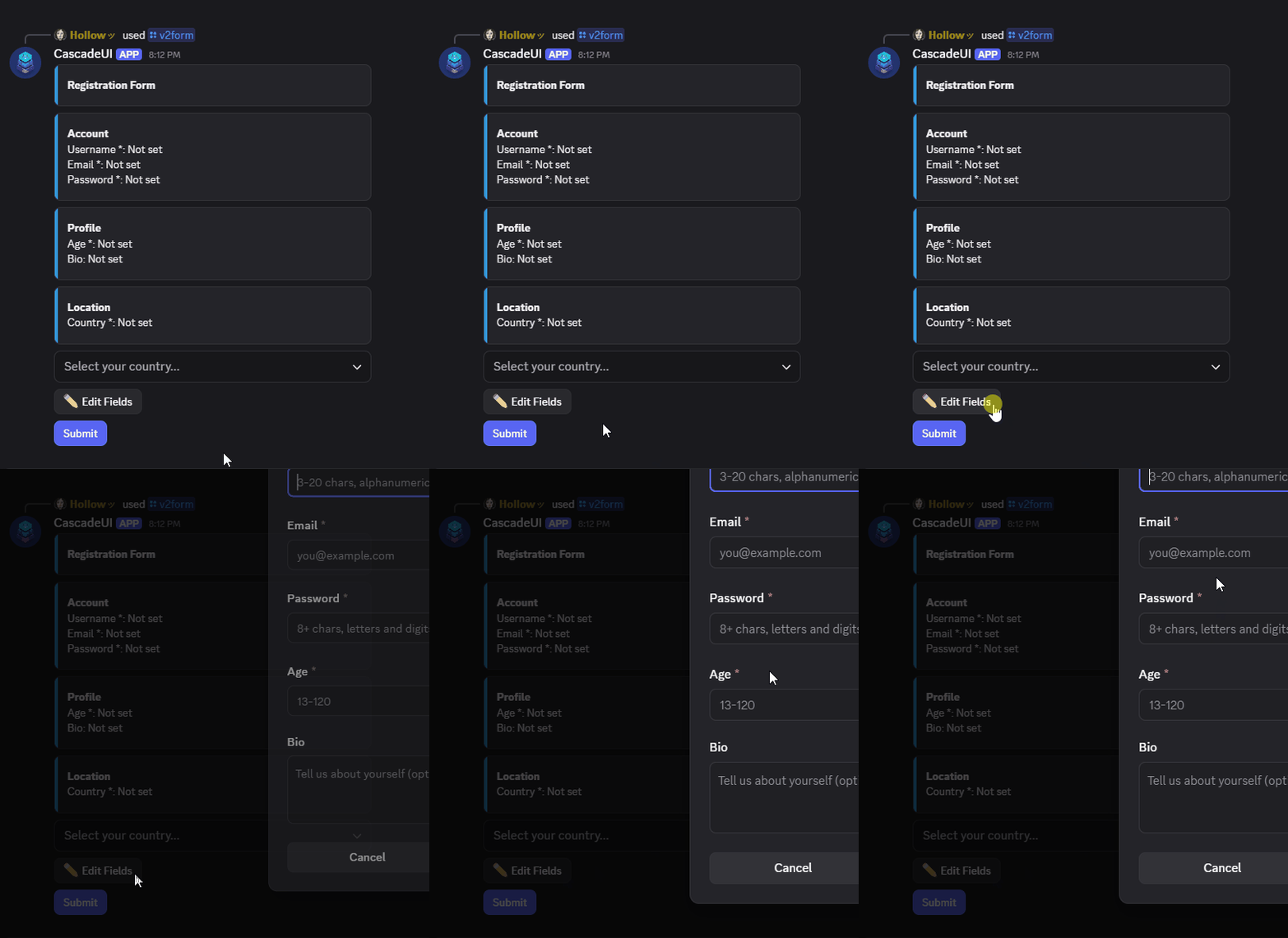
Collect structured input through select menus, boolean toggles, and
text fields (via modal). Text fields are grouped into a single
Modal -- Discord limits modals to 5 text inputs, enforced at
construction time.
Field Definitions
Fields are passed as a list of dicts to the fields constructor parameter:
fields = [
    {
        "id": "username",
        "label": "Username",
        "type": "text",
        "required": True,
        "placeholder": "3-20 chars, alphanumeric + underscores",
        "validators": [min_length(3), max_length(20)],
        "group": "Account",
    },
    {"id": "email", "label": "Email", "required": True,
     "placeholder": "you@example.com", "group": "Account"},
    {"id": "password", "label": "Password", "required": True, "secret": True,
     "placeholder": "8+ chars, letters and digits", "group": "Account"},
    {
        "id": "age",
        "label": "Age",
        "type": "integer",
        "required": True,
        "placeholder": "13-120",
        "min_value": 13,
        "max_value": 120,
        "group": "Profile",
    },
    {"id": "bio", "label": "Bio", "style": discord.TextStyle.paragraph,
     "placeholder": "Tell us about yourself (optional)", "group": "Profile"},
    {
        "id": "country",
        "label": "Country",
        "type": "select",
        "required": True,
        "placeholder": "Select your country...",
        "options": [
            {"label": "United States", "value": "us"},
            {"label": "Japan", "value": "jp"},
        ],
        "group": "Location",
    },
]
| Field Key | Required | Description |
|---|---|---|
id |
Yes | Unique identifier, used as key in self.values |
label |
No | Display label (defaults to id) |
type |
No (defaults to "text") |
"text", "integer", "float", "date", "boolean", "select", or "multi_select" |
required |
No | Whether the field must be filled before submit |
options |
Select only | List of {"label", "value"} dicts |
placeholder |
No | Placeholder text for selects and text inputs |
validators |
No | List of validator callables (see Validation) |
default |
No | Initial value, seeded into self.values at construction for any field type; also pre-fills the modal input for text/integer/float/date fields. A default on a select or boolean field pre-selects that option and satisfies its required check without user interaction. |
style |
Text only | discord.TextStyle.short (default) or .long |
secret |
No | Mask the value in the form display (a password or token) as fixed dots. Discord modals cannot mask the input itself, so this covers the display only. |
min_length / max_length |
Text only | Character limits on text input |
min_value / max_value |
Numeric only | Range limits on integer and float fields, enforced at parse time: an out-of-range or non-finite ("nan", "inf") value is held as an unparsed draft, the same as malformed text, and never reaches self.values. |
group |
No | Field-group label (see Field Groups) |
Typed schemas (FormField / FormSchema)
The dict API stays valid, and both forms reject a typo in
type="interger" at construction. What the typed alternative adds is IDE
auto-complete and failure at schema-definition time rather than when the
view is built.
from cascadeui import FormField, FormSchema

class ProfileSchema(FormSchema):
    def get_fields(self):
        return [
            FormField(id="name", label="Your name", required=True),
            FormField(id="age", label="Your age", type="integer", min_value=0),
        ]

# Either schema= or fields= is accepted; passing both raises ValueError.
FormLayoutView(schema=ProfileSchema())

# Direct FormField list (no schema wrapper) also works.
FormLayoutView(fields=[FormField(id="name", label="Your name")])
FormField.to_dict() lowers to the same dict shape the pattern has always
consumed, so every helper (_collect_modal_fields, validators, parsers)
operates on one canonical representation regardless of input flavor.
Field Groups
Fields that share a group label render together in a visual cluster.
In V2, each group becomes its own card(); in V1 the groups are joined
by blank lines inside the status embed.
fields = [
    {"id": "name", "label": "Name", "type": "text", "group": "Identity"},
    {"id": "pronoun", "label": "Pronouns", "type": "select",
     "options": [...], "group": "Identity"},
    {"id": "email", "label": "Email", "type": "text", "group": "Contact"},
]
Fields without a group key render ungrouped at the top of the form.
Inline validation errors
Form validation errors render inside the form rather than as ephemeral responses. Validators populate field errors automatically on submit. To set an error from custom code, use the public setters, which write the error state and re-render the form so it shows:
await self.set_form_error(msg)sets a form-level (cross-field) error at the top of the form; passNoneto clear.await self.set_field_error(field_id, *msgs)sets inline error(s) under one field; call with no messages to clear that field's errors.
async def on_submit(self, interaction, values):
    if values["start"] > values["end"]:
        await self.set_form_error("Start date must be before end date.")
        return
    ...
The form reaches on_submit only once validation passes (every required
field filled, every value parsed, every validator satisfied), so cross-field
checks belong there. Setting an error and returning keeps the form open with
the message shown, and the next submit re-runs the check. The second click of
a double-click on Submit is dropped, so the check runs once per submit the
user meant. A refusal does not hold off the next Submit, whether validation or
on_submit made it, so one sent after fixing the field runs.
A field change clears only that field's own error; the others stay until they change or the next submit re-checks them.
on_field_changed(field_name, old, new)
Fires after a field value changes (select choice, toggle flip, modal
submit write-back), and only when the value actually moved: old != new
is checked before the hook runs. old is None for a field that had no
value yet. The hook is fire-and-forget and does not block the state
rebuild:
async def on_field_changed(self, field_name, old, new):
    if field_name == "class" and new == "mage":
        self.values["weapon"] = "staff"
Use it for dependent-field updates, analytics, or auto-save. Exceptions inside the hook are logged and swallowed.
Text Field Handling
Text fields cannot render inline -- Discord restricts TextInput to
modals. The form creates a grouped "Edit Text Fields" button that opens
a single Modal containing all text fields. When exactly one text field
exists, the button label auto-adapts to "Edit {label}".
A value that parses is written back to self.values even when a later
validator rejects it: validators run against parsed data, so an integer
field with a range validator still has its parsed int in self.values
if the range check fails. A value that fails to parse ("abc" for an
integer field) is held apart from self.values, which keeps only parsed
values. Either way, reopening the modal prefills what was typed: a
successful parse from self.values, a failed parse from its pending raw
draft. The form's own display reads the same draft, so a typed field
mid-fix shows what was entered rather than "Not set", until it parses or
clears.
A submit where one field fails to parse and another fails a validator shows both errors at once. The two error sets merge before the form re-renders, so fixing one does not need a second submit to find the next.
Duplicate field labels are rejected at construction
A modal input's custom_id derives from its label, so two
modal-rendered fields (text, integer, float, or date) whose
labels slugify to the same id raise ValueError at construction,
naming both fields. Give them distinct labels.
Customization
| Attribute | Default | Controls |
|---|---|---|
text_edit_button_label |
None (auto) |
Label for the text-edit modal button |
text_edit_button_emoji |
"✏️" |
Emoji on the text-edit button |
text_edit_button_style |
secondary |
Style of the text-edit button |
text_edit_modal_auto_defer_delay |
2.5 |
Ack backstop (seconds) for the internal text-edit modal; raise for a slow async field validator, keeping it under 3.0 |
auto_exit_button |
False |
Adds the library's Exit button and keeps it through every re-render |
on_submit(interaction, values)
Called when the user clicks Submit and all validators pass. Override to persist form data, send a receipt, or transition to another view:
class RegistrationForm(FormLayoutView):
    async def on_submit(self, interaction, values):
        await self.respond(
            interaction,
            f"Welcome, {values['name']}!",
            ephemeral=True,
        )
        await self.exit()
The default implementation sends a generic confirmation. After
on_submit returns, the view auto-exits unless on_submit already
called exit(), push(), or replace().
V1 vs V2
- V1 (
FormView): Displays field status in an embed. Controls use row-based layout, capped at Discord's five action rows; eachselectorbooleanfield consumes one row (abooleanfield's Yes/No pair shares a row). The Edit and Submit buttons take the rows after, and share the last row once all five are used, which abooleanrow has room for and aselectrow does not. A field or button that does not fit raisesValueErrorat construction, naming it. UseFormLayoutViewfor forms with more non-text fields than V1's five rows hold. - V2 (
FormLayoutView): Displays field status in aContainerwithTextDisplay. Controls wrapped inActionRow. Full immediate-mode rebuild on every value change -- selectdefaultstates are preserved across rebuilds viaSelectOption(default=...).
WizardView / WizardLayoutView
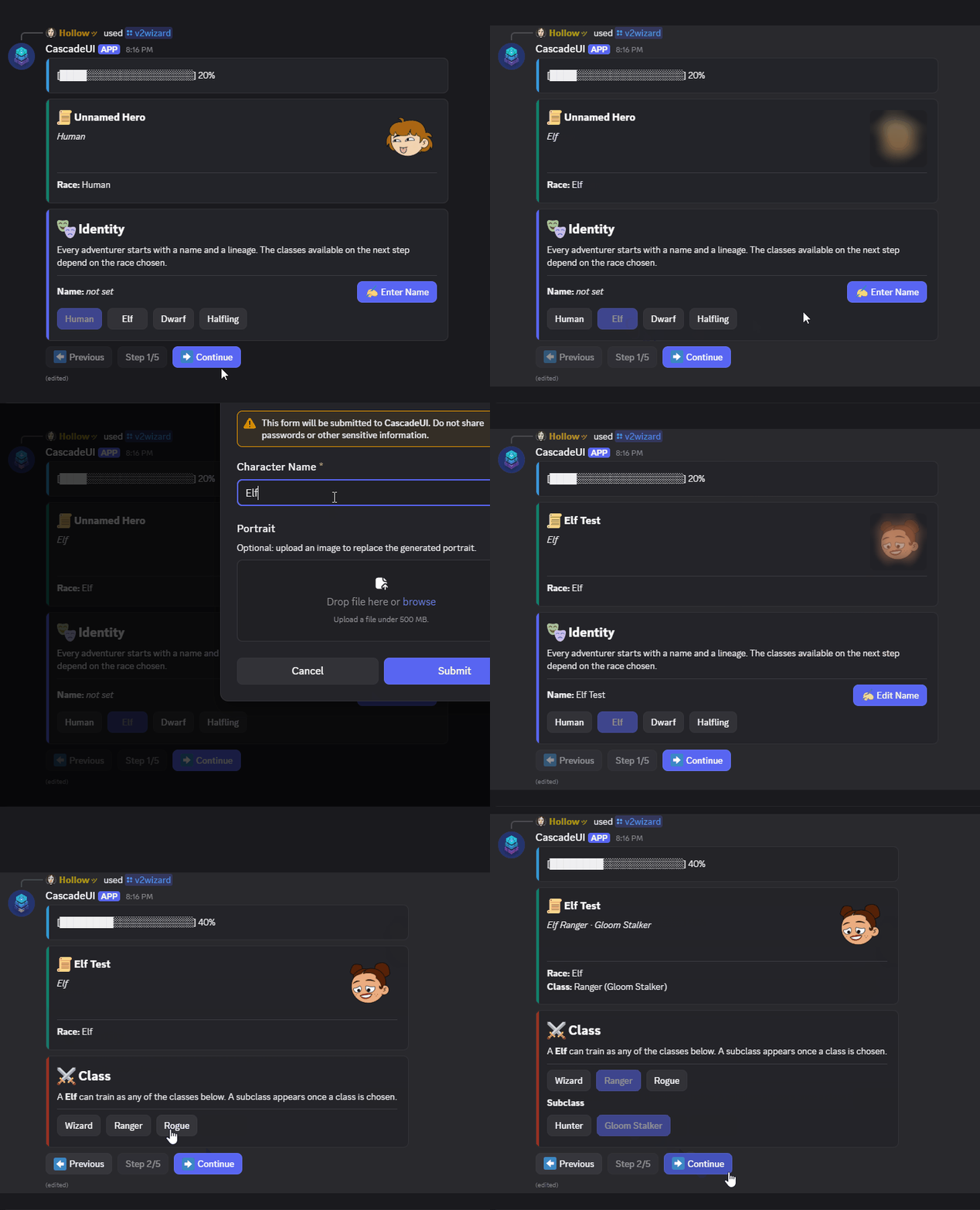
Multi-step form with back/next navigation and per-step validation.
Step Definitions
Steps are passed as a list of dicts to the steps constructor parameter:
class CharacterCreator(WizardLayoutView):
    show_progress_bar = True
    back_button_label = "Previous"
    back_button_emoji = "⬅️"
    next_button_label = "Continue"
    next_button_emoji = "➡️"
    next_button_style = discord.ButtonStyle.primary
    finish_button_label = "Create Character"
    finish_button_emoji = "🎲"

    def __init__(self, *args, **kwargs):
        steps = [
            {"name": "Identity", "builder": self.build_identity,
             "validator": self.validate_identity},
            {"name": "Class", "builder": self.build_class,
             "validator": self.validate_class},
            {"name": "Abilities", "builder": self.build_abilities},
            {"name": "Background", "builder": self.build_background},
            {"name": "Destiny", "builder": self.build_destiny,
             "condition": lambda v: v.heroic_destiny},
            {"name": "Review", "builder": self.build_review},
        ]
        super().__init__(*args, steps=steps, **kwargs)
| Step Key | Required | Description |
|---|---|---|
name |
Yes | Step display name (used in indicator) |
builder |
No | Callable returning content (embed for V1, component list for V2). Sync or async. A step with no builder renders its navigation alone |
validator |
No | Callable returning (valid: bool, error: str) -- gates the Next button. Sync or async |
condition |
No | Callable (view) -> bool -- step is skipped when it returns False. Must be synchronous |
When a validator returns (False, "error message"), the error is shown
as an ephemeral message and the wizard stays on the current step.
Conditional steps
The condition key gates step visibility on runtime view state. The
callable receives the view and returns True to include the step or
False to skip it. Skipped steps are hidden from navigation and the
step indicator, and step numbering re-flows automatically.
steps = [
    {"name": "Basics", "builder": self.build_basics},
    {"name": "Advanced", "builder": self.build_advanced,
     "condition": lambda v: v.enable_advanced},
    {"name": "Confirm", "builder": self.build_confirm},
]
Condition callables are evaluated on every navigation, so toggling
enable_advanced mid-wizard updates the flow immediately.
Typed schemas (WizardStep / WizardSchema)
Same pattern as the form side. Both forms reject a non-callable builder,
validator or condition at construction, and both reject a condition
that is async or cannot accept the view (the visibility check treats a
raising predicate as visible, so a zero-argument one would render the step
it meant to hide). What the typed variant adds is IDE auto-complete, a required
builder (the dict form treats it as optional, since a step with none
renders its navigation alone), and failure at schema-definition time rather
than when the view is built.
from cascadeui import WizardStep, WizardSchema

class SetupSchema(WizardSchema):
    def __init__(self, view):
        self.view = view

    def get_steps(self):
        return [
            WizardStep(name="Welcome", builder=self.view.build_welcome),
            WizardStep(name="Config", builder=self.view.build_config,
                       validator=self.view.validate_config),
            WizardStep(name="Confirm", builder=self.view.build_confirm),
        ]

class SetupWizard(WizardLayoutView):
    def __init__(self, *args, **kwargs):
        super().__init__(*args, schema=SetupSchema(self), **kwargs)
The schema holds no wizard state -- it is a recipe for step construction. Per-step values live on the view as they always have.
Customization
| Attribute | Default | Controls |
|---|---|---|
back_button_label |
None |
Label for the Back button. None renders "Back" |
back_button_emoji |
None |
Emoji on the Back button |
back_button_style |
secondary |
Style of the Back button |
next_button_label |
None |
Label for the Next button. None renders "Next" |
next_button_emoji |
None |
Emoji on the Next button |
next_button_style |
primary |
Style of the Next button |
finish_button_label |
None |
Label on the last step's button. None renders "Finish" |
finish_button_emoji |
None |
Emoji on the Finish button |
finish_button_style |
success |
Style of the Finish button |
step_indicator_label |
None |
Callable(current, total) -> str for custom indicator. Must be synchronous; an async def is refused at class definition. |
show_progress_bar |
True |
V2 only -- renders a progress header above the step content whenever more than one step is visible |
auto_exit_button |
False |
Adds the library's Exit button and keeps it through every step change |
The step indicator defaults to "Step {n}/{total}". Pass a callable
for custom formatting:
class MyWizard(WizardLayoutView):
    # staticmethod is required: a bare lambda in a class body binds as a
    # method and would receive self as its first argument.
    step_indicator_label = staticmethod(
        lambda current, total: f"Phase {current} of {total}"
    )
Progress header (V2)
WizardLayoutView renders a progress header inside a card() above the
step content by default, whenever more than one step is visible. The
default header is a proportional progress bar. Set
show_progress_bar = False to suppress it.
Override _build_progress_header(visible_indices) to customize the header
component. Returning None suppresses it for that render:
class SetupWizard(WizardLayoutView):
    def _build_progress_header(self, visible_indices):
        # visible_indices holds the steps whose condition currently passes,
        # so the count tracks what the user will actually walk through.
        # step_count would include steps this run has skipped.
        position = visible_indices.index(self.current_step) + 1
        return card(
            f"## Step {position} of {len(visible_indices)}",
            progress_bar(position, len(visible_indices)),
        )
Lifecycle hooks
WizardView and WizardLayoutView expose three navigation hooks for
reacting to step transitions and validation outcomes:
| Hook | Fires |
|---|---|
on_step_entered(step_index) |
When Next or Back moves to a step, before its builder runs. Does not fire for the first step on the initial render, or again when a step's render does not land and the wizard stays where it was |
on_step_exited(step_index) |
Before leaving a step (next or back) |
on_validation_failed(step_index, error, interaction=None) |
When the current step's validator returns (False, error) |
async def on_step_entered(self, step_index):
    await self.analytics.log("wizard_step_entered", step=step_index)

async def on_validation_failed(self, step_index, error, interaction=None):
    self.failed_attempts += 1
Overriding on_validation_failed replaces the default, which is what shows
the validator's message to the user. Keep the interaction parameter and
either call super() or send the feedback yourself, or a failed step
rejects the user silently.
Hooks are fire-and-forget -- exceptions raised inside them are logged but do not block navigation.
on_finish(interaction)
Called when the user clicks Finish (or Next on the last step). The
default implementation defers and exits. Override to persist wizard
state or transition. An override may leave the wizard open (to refuse, or
to show a result in place); of the Finish clicks sent before on_finish
returns, only the first runs it (a Finish the step's validator refused does
not count):
async def on_finish(self, interaction):
    await self.respond(interaction, "Setup complete!")
    await self.exit()
Properties
| Property | Type | Description |
|---|---|---|
current_step |
int |
Zero-based index of the active step |
step_count |
int |
Total number of steps |
refresh_content() |
async method | Re-render the current step in place after a subclass callback mutated data (V1 rebuilds the embed, V2 recomposes the tree). Distinct from reload(), which re-runs on_load() first; it waits for a reload() already running. |
V1 vs V2
- V1 (
WizardView): Step builders returndiscord.Embed. Nav buttons placed on row 4. - V2 (
WizardLayoutView): Step builders return a list of V2 components (or a single component). Nav buttons placed in anActionRow. The first step's content is built inon_load(), since async builders cannot run in__init__.
Overriding on_load() on a wizard
WizardLayoutView builds its step content in on_load(). A subclass
that overrides the hook must call super().on_load(), or the view
renders its nav row above nothing:
TabView / TabLayoutView
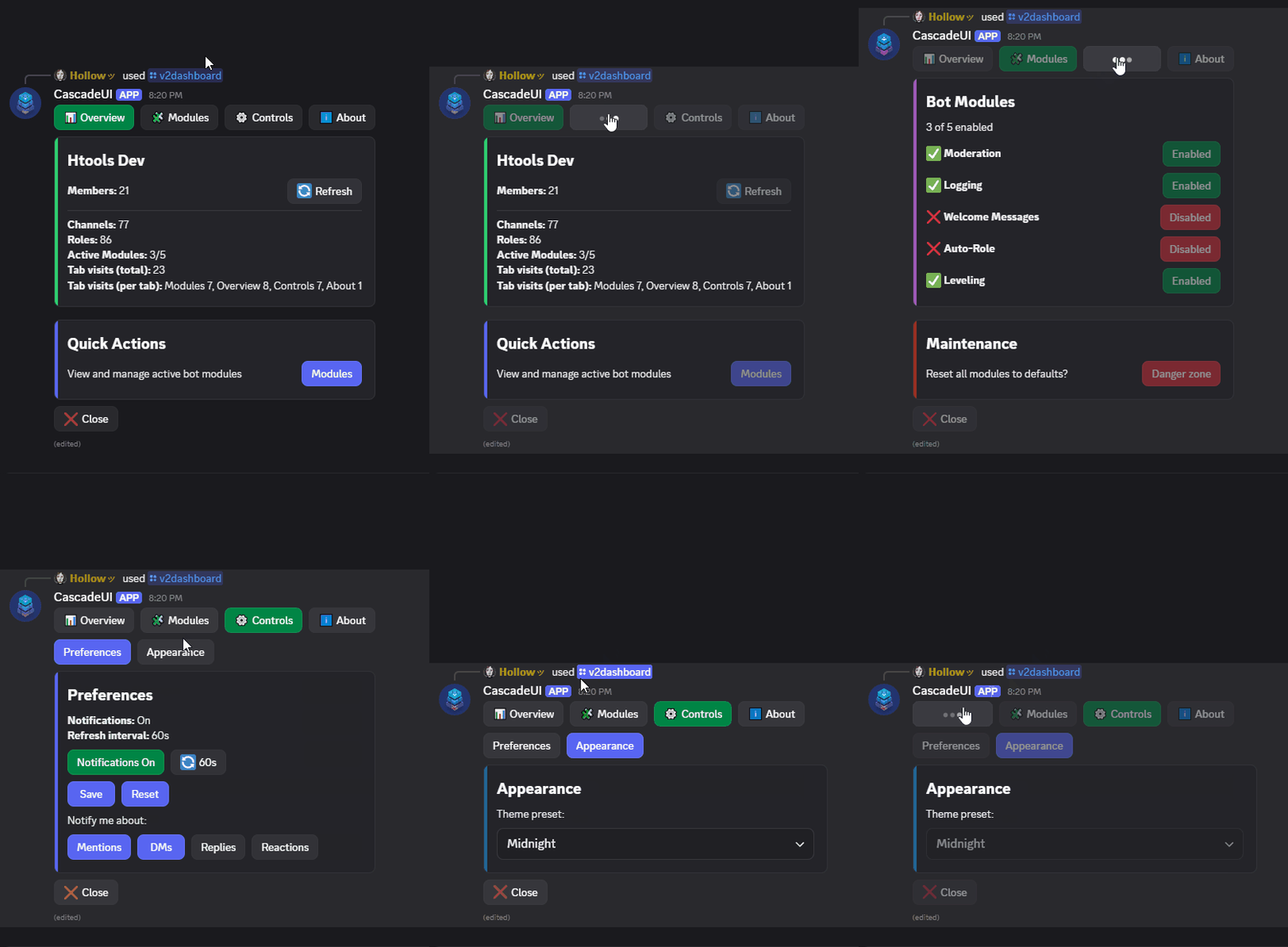
Tabbed interface with button-based tab switching.
Tabs vs navigation vs tab_nav
Three tools cover "more than one view," and their use cases are distinct:
TabLayoutViewkeeps a few sibling views in one message behind a persistent tab bar. Reach for it when the user flips between sections frequently and wants them all one click away (a settings panel, a dashboard, a profile). Cost: one ActionRow is permanently spent on the tab bar.- push/pop navigation (
push()/pop()) is for hierarchical drill-down (a hub to a detail to a sub-detail) with back history. Reach for it when each view is heavy or the flow is a tree, not a flat set of peers. tab_nav()is the tab look without the pattern's lifecycle: a row of tab-styled buttons the view switches in its own callback. Reach for it for a lightweight switch or for inner sub-navigation within oneTabLayoutViewtab (seeexamples/v2_dashboard.py).
Tab Definitions
Tabs are passed as a dict mapping names to builder functions, or as a sequence of (name, builder) pairs. A builder may be async def or a plain def:
class DashboardView(TabLayoutView):
    active_tab_style = discord.ButtonStyle.success

    def __init__(self, *args, **kwargs):
        tabs = {
            "📊 Overview": self.build_overview,
            "🧩 Modules": self.build_modules,
            "⚙️ Controls": self.build_controls,
            "ℹ️ About": self.build_about,
        }
        super().__init__(*args, tabs=tabs, **kwargs)

    async def build_overview(self):
        return [card(f"## {self.guild.name}", key_value(self.stats))]
Customization
| Attribute | Default | Controls |
|---|---|---|
active_tab_style |
primary |
Style of the currently selected tab button |
inactive_tab_style |
secondary |
Style of unselected tab buttons |
tab_overflow_policy |
"fill" |
How tab buttons distribute across ActionRows when more than five tabs are present. Accepts "fill" (pack greedily, five-per-row), "balance" (spread evenly), "pin_first" (first tab always alone on row 0), "pin_last" (last tab always alone on the final row), or a tuple[int, ...] naming the button count per row. Validated at class-definition time. Tuple-vs-button-count drift produces a runtime warning and auto-adjusts. |
auto_exit_button |
False |
Adds the library's Exit button and keeps it through every tab switch |
on_tab_switched(index)
Called after _active_tab is updated, before the content refresh.
Default is a no-op. Override for analytics, async setup, or validation:
async def on_tab_switched(self, index):
    if self._tab_names[index] == "History":
        await self._load_history()
Properties and Methods
| Member | Type | Description |
|---|---|---|
active_tab |
str (property) |
Name of the currently active tab |
switch_tab(name, *, notify=True) |
async method | Switch to a tab by name programmatically; notify=False skips on_tab_switched for a switch the view makes on its own |
refresh_content() |
async method | Re-render the active tab in place after a subclass callback mutated data (V1 rebuilds the embed, V2 recomposes the tree). Distinct from reload(), which re-runs on_load() first; it waits for a reload() already running. |
switch_tab() raises ValueError if the tab name is not found.
_build_tab_rows(buttons)
Override hook called during tab-row construction. Receives the list of
tab StatefulButton objects and returns list[list[StatefulButton]] --
each inner list becomes one row. The default implementation applies
tab_overflow_policy. Override when the preset strategies and the
tuple form do not match a bespoke layout:
def _build_tab_rows(self, buttons):
    # Pin the first two tabs together, rest on a second row
    return [buttons[:2], buttons[2:]]
V1 vs V2
- V1 (
TabView): Tab builders returndiscord.Embed. Tab buttons distribute across rows viatab_overflow_policy;button.rowis assigned from the row index. - V2 (
TabLayoutView): Tab builders return a list of V2 components. Each row produced by_build_tab_rowsis wrapped in its ownActionRowbefore being added to the layout. The active tab's content is built inon_load().
Overriding on_load() on a tab view
TabLayoutView builds its tab content in on_load(). A subclass that
overrides the hook must call super().on_load(), or the view renders
its tab row above nothing:
PaginatedView / PaginatedLayoutView
Navigate through multi-page content with built-in first/prev/next/last buttons.
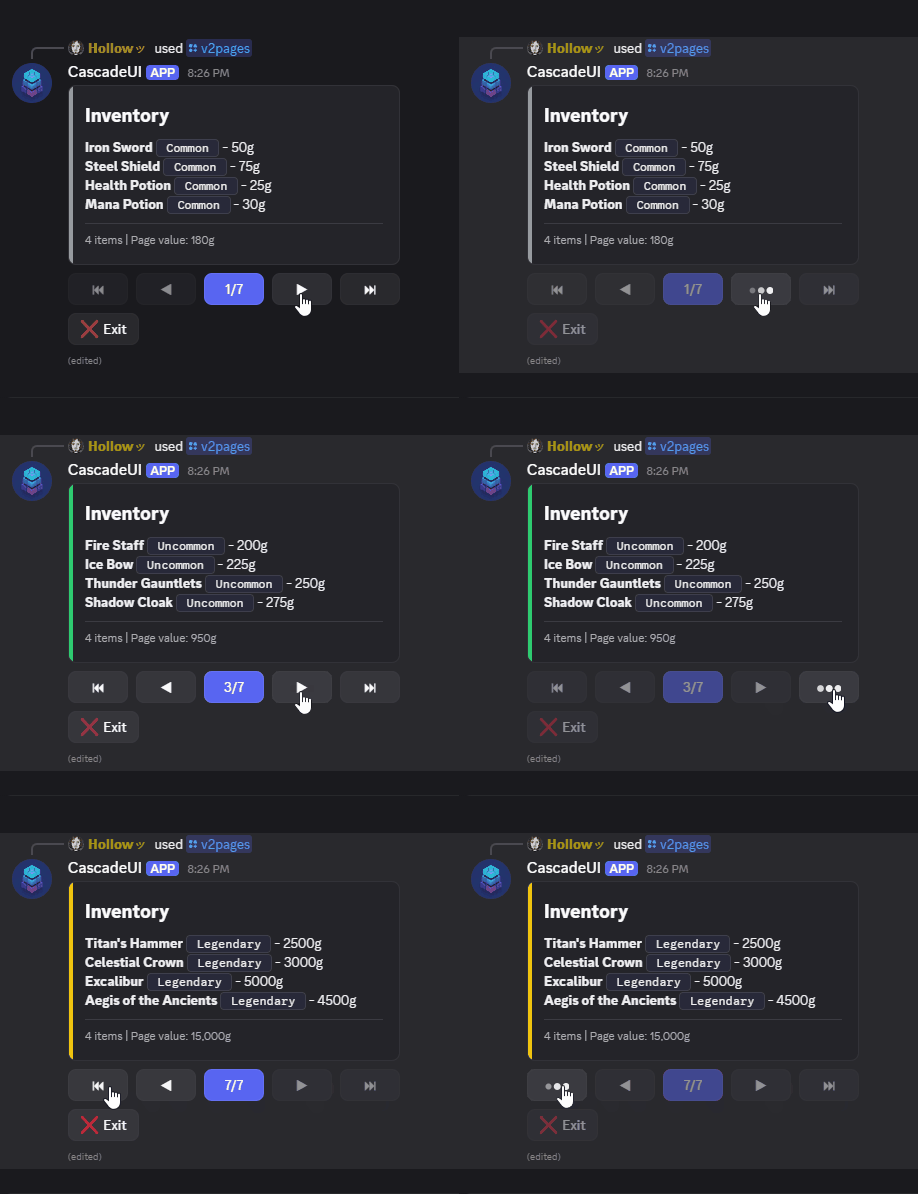
Page Data
Pages are passed to the pages constructor parameter. Accepted formats
differ by version:
V1 pages:
discord.Embedobjectsstrfor plain text contentdictwith"embed"and/or"content"keys
V2 pages:
- A list of V2 components (
Container,TextDisplay, etc.) - A callable (sync or async) returning a list of V2 components
str(auto-wrapped inContainer(TextDisplay(...)))
from_data() Classmethod
Auto-paginate a list of items:
import discord
from cascadeui import PaginatedLayoutView, card, divider

RARITY_COLORS = {
    "Common": discord.Color.light_grey(),
    "Uncommon": discord.Color.green(),
    "Rare": discord.Color.blue(),
    "Legendary": discord.Color.gold(),
}

def format_page(items):
    lines = [f"**{item['name']}** ` {item['rarity']} ` - {item['value']}g" for item in items]
    total = sum(item["value"] for item in items)
    return [card(
        "## Inventory",
        "\n".join(lines),
        divider(),
        f"-# {len(items)} items | Page value: {total:,}g",
        # The list is sorted by rarity, so the last item is the rarest on the page.
        color=RARITY_COLORS[items[-1]["rarity"]],
    )]

class InventoryView(PaginatedLayoutView):
    auto_exit_button = True

view = await InventoryView.from_data(
    items=inventory,
    per_page=4,
    formatter=format_page,
    context=ctx,
)
await view.send()
A V1 formatter returns what a V1 page accepts, a discord.Embed for example.
The formatter can be sync or async. Views created via from_data()
support refresh_data(items) -- re-paginates with new data using the
original per_page and formatter, clamps the page cursor, and
refreshes the message.
from_cursor() Classmethod
For large datasets where loading every item into memory is wasteful (database rows, API results), cursor mode fetches one page at a time on demand:
async def fetch_users(offset: int, limit: int) -> list[dict]:
    return await db.fetch(
        "SELECT id, name FROM users ORDER BY name LIMIT $1 OFFSET $2",
        limit, offset,
    )

total = await db.fetchval("SELECT count(*) FROM users")

view = PaginatedView.from_cursor(
    fetch_users,
    total=total,
    per_page=10,
    formatter=format_users_page,
)
await view.send()
fetch_fn(offset, limit) matches SQL / REST / Firestore idioms so
typical backends drop in unchanged. A fetch_fn that cannot take both
positional arguments raises TypeError at from_cursor() naming the
signature it saw: cursor mode stores the callable and calls it for the
first time from inside on_load, so an arity mismatch is caught before
that first page load rather than surfacing from the page loader. The
formatter gets the same check: one that cannot take the page's item
chunk raises TypeError here too. from_data needs no equivalent,
since it applies the formatter during construction and a wrong signature
already fails on the caller's own line. Pages
load lazily as the caller navigates; up to cache_size (default 10)
recent pages stay resident, evicted in LRU order. The page currently
displayed is never evicted -- revisiting it always avoids a refetch.
total is required because the Page N/M indicator, the goto
modal, and the first/last jump buttons all need the total page
count at construction time. Query it alongside the first page
fetch; it is cheap for most backends.
Use refresh_pages() when page contents change but the row count
did not (the cache flushes; the current page refetches for
immediate display). Use refresh_pages(new_total=N) when rows
were inserted or deleted -- the pages list resizes, jump buttons
rebuild against the new total, and current_page clamps to the
last valid index when the list shrinks.
refresh_data() and refresh_pages() are mode-exclusive: eager
views raise RuntimeError on refresh_pages(), cursor views
raise on refresh_data(). The error messages name the correct
method for the view's construction mode.
Customization
Each navigation button exposes a {label, emoji, style} triple:
| Attribute | Default | Controls |
|---|---|---|
first_button_label |
"⏮" |
First-page jump button |
first_button_emoji |
None |
|
first_button_style |
secondary |
|
prev_button_label |
"◀" |
Previous page button |
prev_button_emoji |
None |
|
prev_button_style |
secondary |
|
indicator_button_label |
None (auto) |
Page indicator and go-to button |
indicator_button_format |
None (auto) |
Page indicator and go-to button |
indicator_button_emoji |
None |
Go-to button only |
indicator_button_style |
primary |
Go-to button only |
next_button_label |
"▶" |
Next page button |
next_button_emoji |
None |
|
next_button_style |
secondary |
|
last_button_label |
"⏭" |
Last-page jump button |
last_button_emoji |
None |
|
last_button_style |
secondary |
|
jump_threshold |
5 |
Minimum page count at which first/last and go-to appear |
auto_exit_button |
False |
Adds the library's Exit button and keeps it through every page turn |
When the page count reaches jump_threshold or above, three extra
controls appear: first-page and last-page jump buttons, and a
go-to-page modal triggered by clicking the page indicator.
Below that threshold the indicator is a disabled button that always renders
secondary with no emoji, since a disabled button in an accent colour reads
as one that is broken. indicator_button_label and
indicator_button_format still apply; the style and emoji reach the
clickable go-to button only.
Reformatting the page indicator
indicator_button_label replaces the middle button's text with a literal,
which freezes one string across every page. indicator_button_format
templates it instead:
class StandingsBoard(LeaderboardLayoutView):
    indicator_button_format = "{page}/{total}"   # "3/12" rather than "Page 3/12"
    jump_threshold = 999                          # keep the three-button row at any page count
{page} and {total} are one-based, matching the rendered defaults and the
go-to modal's prompt. Unset, each node keeps its own default: the passive
indicator reads Page 3/12 and the clickable go-to button reads 3/12. A
literal indicator_button_label still wins when both are set.
A template that cannot render raises ValueError at class definition rather
than from inside a click, so a typo'd placeholder ({pages}), an unbalanced
brace, or a positional {} fails at import.
Raising jump_threshold above the page count is what keeps the row narrow:
the same branch decides whether the first and last buttons appear and which
of the two labels the middle takes, so a three-button row and the short text
are reachable together only through the format attribute.
set_page(n)
Jump to a zero-based page programmatically. Clamps n to the valid
range, fires on_page_changed, and re-renders. This is the supported
cursor move: assigning current_page directly changes the index but
does not re-render.
Pass notify=False for a jump the view makes on its own rather than one
the user asked for, such as a return to the first page after a period
of inactivity. on_page_changed is skipped; the render is the same.
on_page_changed(page)
Called after current_page updates, before the refresh. Default is a
no-op. Override for analytics, prefetch, or per-page validation:
Fires before the repaint
This reports the move the user asked for. If that repaint's edit never
lands (dropped, refused, or its render raised) the cursor is rewound and
the hook is not called again, so an override that counts moves or
writes state records one the user never saw. Read refresh_degraded
after the move if that matters. See
Transport Failures Degrade Quietly.
_build_extra_items()
Hook for adding components below the navigation buttons. Called once during init. Items added here are preserved across page turns:
async def _on_refresh(self, interaction):
    # reload() takes no positional, so it cannot be a callback directly;
    # a button callback is always invoked as callback(interaction).
    await self.reload()

def _build_extra_items(self):
    self.add_item(ActionRow(
        StatefulButton(label="Refresh", callback=self._on_refresh),
    ))
V1 vs V2
- V1 (
PaginatedView): All nav buttons placed on row 0. Content displayed via embed/content kwargs torefresh()._extract_page()omits absent keys somessage.editdoes not clear existing fields. - V2 (
PaginatedLayoutView): Nav buttons in a singleActionRow. Page content is a list of V2 components that replace the view's children on each page turn. The nav row and extra items keep their identity across page changes.
nav_inside_container
V2-only class attribute on PaginatedLayoutView. When True, the page
content and the navigation ActionRow are wrapped in a single Container
so the paginator renders as one cohesive card with built-in navigation:
Default is False, which keeps the page content and nav row as separate
top-level children of the view -- the original layout. Items added via
_build_extra_items remain outside the wrapping Container in either
mode. Single-page views render no nav row, so the flag has no effect
when only one page is displayed.
A page that mixes a Container with other top-level items (a rankings
card plus a build_header card above, or a Container footer below)
cannot be wrapped, since Discord forbids Container nesting. Those pages
keep the sibling layout with the nav row as a separate row; pages that
can wrap still do.
Set nav_divider = True (default False) to render a divider between the
page content and the in-card nav row, giving the pager a visual separator.
It has no effect in the sibling layout.
On a LeaderboardLayoutView, build_footer placement follows its return type.
A raw component folds inside the rankings
card (below the entries), so a caption stays attached to the ranking rows; a
Container (card(...)) renders as its own card below the rankings. With
nav_inside_container = True the pager joins an in-card footer inside the same
card unit.
Binding per-instance state to a formatter
The formatter= callable receives one chunk and returns the page's V2
component list. When the formatter needs per-instance state (a category
name, a per-paginator accent color, a footer string), bind it via a
closure factory:
def make_formatter(name: str, accent: discord.Color):
    def format_page(items):
        lines = [f"**{i['name']}** -- {i['detail']}" for i in items]
        return [
            card(
                f"## {name}",
                divider(),
                TextDisplay("\n".join(lines)),
                color=accent,
            )
        ]
    return format_page

view = await CategoryListView.from_data(
    items=items,
    per_page=3,
    formatter=make_formatter(name="Books", accent=discord.Color.blurple()),
    interaction=interaction,
)
The factory closes over name and accent, returning a format_page
that the paginator calls per chunk. examples/v2_library.py uses this
pattern with three categories, each binding its own name and color.
The same shape extends to per-page footers, conditional badges,
locale-bound strings, or any other data the formatter needs to weave
into the rendered page.
Coming from a paginator gist?
The discord.py community frequently points new bot authors at
@Soheab's
CV2 paginator gist
and classic paginator gist
as reference implementations. CascadeUI's PaginatedView and
PaginatedLayoutView cover the same surface and several capabilities
the gists do not. Migration map for users coming from those gists:
| Soheab's gist | CascadeUI |
|---|---|
author_id |
owner_only = True (default) and the allowed_users set |
format_page() |
formatter= kwarg on from_data / from_cursor (sync or async, auto-detected) |
| Stop button | add_exit_button() inside _build_extra_items(); cleanup behavior controlled by exit_policy |
convert_str_to_text_display |
automatic -- string pages are wrapped in Container(TextDisplay(s)) |
per_page |
same -- from_data(items, per_page=N) |
| Pages wrapped in a Container with buttons inside | nav_inside_container = True |
| Push paginator from a button click | await self.push(await Paginator.from_data(...), interaction, ...) -- push accepts the pre-constructed instance directly |
| Timeout cleanup | automatic -- a timed-out view freezes its components; override on_timeout to delete instead |
CascadeUI adds beyond the gists:
from_cursor(fetch_fn, total, ...)for lazy / streaming pagination with an LRU page cache and current-page eviction protectionrefresh_data(items)andrefresh_pages()for live updates- Render-hash short-circuit so repeat refreshes that compute the same tree skip the Discord REST edit
- One-HTTP-call refresh path on the acting interaction (combined ack + edit packet)
- Auto-defer +
serialize_interactionssafety net for rapid clicks - Full state-store integration: subscribed actions, undo/redo, persistence
- Access control via
owner_only,allowed_users, andparticipant_limit - Instance limiting + replacement policies
- Compose with
_PersistentMixinfor paginators that survive bot restarts
@Soheab's gists shaped CascadeUI's paginator grammar and remain excellent learning material for the underlying discord.py V1 and V2 primitives.
LeaderboardLayoutView / PersistentLeaderboardLayoutView
V2-only paginated ranked display pattern. Accepts a list of
(user_id, stats_dict) tuples and renders one card-based page per
leaderboard_per_page chunk, with optional build_header /
build_footer frame content on whichever pages the override chooses,
plus cross-page rank numbering. Builds on top of PaginatedLayoutView, so
every paginated feature (first/last buttons, go-to modal, jump
threshold) is available.
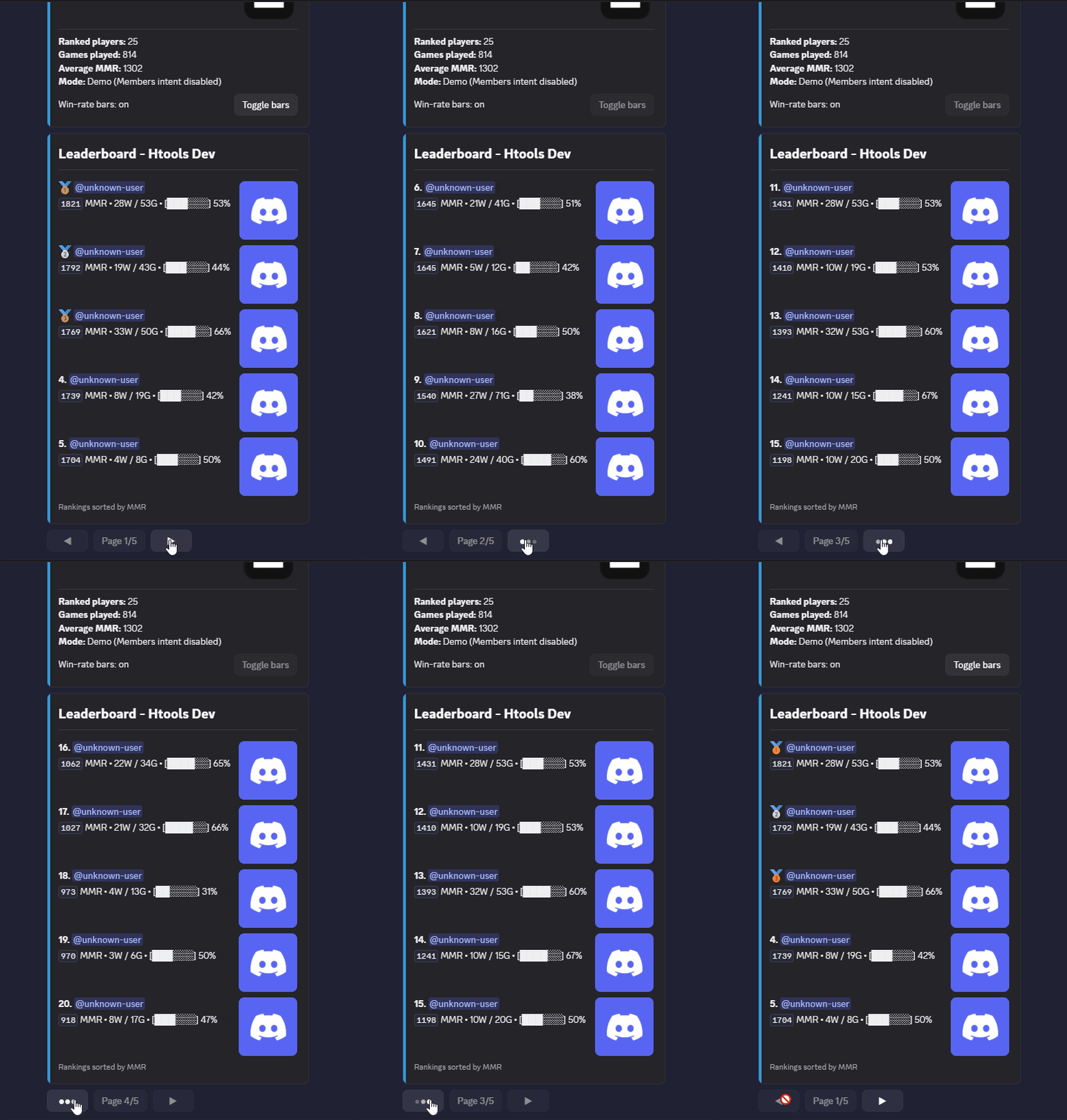
When all entries fit on a single page, no navigation buttons render -- the view behaves as a static card.
Minimal example
from cascadeui import LeaderboardLayoutView


class ServerLeaderboard(LeaderboardLayoutView):
    leaderboard_top_n = 10
    leaderboard_per_page = 5


entries = [
    (user_id, {"wins": 12, "games": 20}),
    (user_id_2, {"wins": 8, "games": 15}),
    # ...
]

view = ServerLeaderboard(
    context=context,
    entries=entries,
    title=f"Leaderboard - {context.guild.name}",
)
await view.send(ephemeral=True)
The recording above is examples/v2_leaderboard.py, which builds on this shape:
two-line rows with avatars (entry_layout = "sections"), an Overview card
from build_header, and a footer line from build_footer.
Override hooks
Each row composes from four small hooks so subclasses can override the
smallest piece they need. The default format_entry stitches them
together; override it directly only when the row layout itself needs to
change (multi-line, different separator).
| Hook | Purpose |
|---|---|
get_entries() |
Data source. Default returns the constructor entries= kwarg. A synchronous override reads memory (store.computed, StateStore.iter_scoped, a cache of your own); async def is accepted for a source that must be awaited. |
format_rank(rank) |
Rank column. Default returns a medal emoji for ranks 1-3 (gold, silver, bronze) and **<rank>.** for rank 4+. |
format_name(user_id, stats) |
Name column. Default renders <@user_id>; rows carrying a display_name key render that value verbatim, so any markdown in it is yours to choose. |
format_stats(user_id, stats) |
Inline stat column. Default returns <W>W / <G>G. Override to surface game-specific stats (MMR, win rate, streak). |
format_accessory(user_id, stats) |
Optional right-side accessory appended to the row. Default returns None (omitted). |
format_entry(rank, user_id, stats) |
Composes the four hooks above into one line. Override directly only when the row layout itself needs to change. |
format_primary(rank, user_id, stats) |
Section render mode only -- first line of the two-line section body. Default delegates to format_rank + format_name. |
format_secondary(rank, user_id, stats) |
Section render mode only -- second line of the section body. Default delegates to format_stats. |
get_avatar_url(user_id, stats) |
Async hook returning an avatar URL for the section's Thumbnail accessory. The default resolves from the bot's user cache when a bot= kwarg is passed (member avatar on a hit, Discord default avatar on a miss); without a bot it returns None, triggering the stacked TextDisplay fallback. |
resolve_avatar_urls(user_ids) (async) |
Section-mode avatar backfill, used when avatar_backfill = True. Receives a list of user ids and returns a {user_id: url} dict, resolved off the render path. Default resolves per user; override for a CDN or warmed cache. |
build_title(page) |
Optional components replacing the rankings card's masthead (the banner image + ## title heading) inside the Container. None (default) composes the masthead from the declarative banner / title pair. Same return shapes and page semantics as build_header. |
build_header(page) |
Content above the rankings card. The value is prepended as-is: a Container renders as its own card (an Overview stats_card, a banner), anything else floats as a bare top-level item (no return-type branching, unlike build_footer). Read ranked_entries for stats over the ranked rows, and the full list get_entries() returns for totals across every entry. Return a component, a list, or None (default). page is the zero-based page index, so a frame can target only some pages. |
build_footer(page) |
Optional footer components, placed by return type: a raw component (caption, link row, image) folds inside the rankings card; a Container (card(...)) renders as its own card below it. Same return shapes and page semantics as build_header. |
ranked_entries (property) |
The loaded top-N (user_id, stats) slice; read it in build_header / build_footer / build_title for stats over the rows shown. It holds only the top leaderboard_top_n, so totals across every entry come from get_entries(). |
on_leaderboard_empty() |
Returns the V2 component list shown when entries is empty. Default wraps leaderboard_empty_message in a single card. The masthead composes above this return, so a board keeps its banner / title while empty and an override inherits it; build_title returning [] renders no masthead on that page. ranked_entries is empty here. build_header and build_footer run on this page too: header content renders above the masthead, footer content below the empty-state card, each in the order returned. |
on_state_changed(state) |
Runs rebuild_pages() before the paginated refresh -- lets live-data subclasses re-fetch on every subscribed action. The rebuild short-circuits when the entries signature (user ids + stats) is unchanged, so identical re-fetches cost one comparison instead of a full page rebuild. |
format_rank, format_name, format_stats, and format_accessory compose the row inside the synchronous format_entry, so they must be plain defs; an async def override is refused at class definition.
What entries= accepts. A sequence of (user_id, stats_dict) pairs is
the documented shape. Three other containers carrying the same data convert
rather than being refused, and anything else raises TypeError naming the
class, the argument, and the offending index. See
the API reference for the full list.
from cascadeui import LeaderboardLayoutView, render_progress


class MmrBoard(LeaderboardLayoutView):
    def format_stats(self, user_id, stats):
        wins = stats["wins"]
        games = stats["games"]
        bar = render_progress(wins, games or 1, width=6, show_percent=True)
        return f"`{stats['mmr']}` MMR \u2022 {wins}W / {games}G \u2022 {bar}"
Class attributes
leaderboard_top_n(default10) -- how many entries to consider from the data source.leaderboard_per_page(default5) -- entries per page. Set toNoneto collapse the display into a single page equal totop_n(no navigation controls). At the default, atop_nof 10 produces two pages with prev/next controls, and atop_nof 25 surfaces the full first/last + go-to-page surface.title(default"Leaderboard") -- H2 heading on the rankings card. Constructortitle=kwarg overrides;title=None(or an empty string) renders no text heading, so a banner-only masthead needs no hook override. With neithertitlenorbannerset, the title divider is skipped too.banner(defaultNone) -- full-width image at the top of the rankings card, above the title heading when both are set. Accepts a URL string, adiscord.File, or anything with a string.url(guild.iconworks directly). Constructorbanner=kwarg overrides the class attribute; thebuild_titlehook overrides both.subtitle(default"Rankings") -- H3 above the ranked rows. Set toNoneor empty string (or passsubtitle=Noneat construction) to skip the H3 entirely, which pairs naturally with an Overviewbuild_headercard that already carries its own heading.leaderboard_empty_message-- static text when no entries exist.entry_layout(default"lines") -- controls row rendering."lines"stacks entries asTextDisplayrows inside a single card;"sections"renders each entry as aSectionwith aThumbnailaccessory and a two-line body (format_primary+format_secondary). Section mode capsleaderboard_per_pageat5: setting a larger value withentry_layout = "sections"raises at class-definition time via_validate_class_attributes.podium_emojis(default gold/silver/bronze medals) -- dict keyed by rank number.format_rankreads this for ranks 1-3; ranks beyond fall back tof"**{rank}.**". Override the dict on a subclass to change the podium glyphs (or extend it past rank 3) without overridingformat_rankitself.entry_separator(default" -- ") -- string rendered between the name and stat columns insideformat_entry("lines"mode). Override on a subclass for visual variety (" | "," • ", etc.) without rewritingformat_entry.card_color(defaultNone) -- optional accent color for the rankings card.Nonefalls through to the active theme's accent. Set to adiscord.Coloron a subclass to give the rankings card its own accent (useful when abuild_headerOverview card carries its own color and a deliberate two-color layout is wanted).show_title_divider(defaultTrue) -- whether to render a horizontal divider below the title and above the rest of the card content. Set toFalsefor a more compact card.avatar_backfill(defaultFalse) -- section render mode only. Paints Discord default avatars immediately, then resolves the real avatars off the render path (via theresolve_avatar_urlshook) and reloads once they arrive. Avoids a first render that blocks on avatar resolution and a per-row fetch on the render path. See Avatar backfill on large guilds.
title, subtitle, entry_separator, leaderboard_empty_message, and
podium_emojis are checked when the class is defined: a value of the wrong
type raises TypeError naming the attribute, so a podium_emojis keyed by
strings (which never matches a rank) fails at import instead of rendering
plain numbers.
Section render mode
When entry_layout = "sections", each leaderboard row becomes a
Discord Section with the user's avatar as the accessory and two lines
of text. Pass bot= and the built-in get_avatar_url resolves each
avatar from the user cache. Override only format_secondary for a
custom second line:
class AvatarBoard(LeaderboardLayoutView):
    entry_layout = "sections"
    leaderboard_per_page = 5

    def format_secondary(self, rank, user_id, stats):
        return f"{stats['wins']}W / {stats['games']}G"

# Pass the bot so the default get_avatar_url can resolve avatars.
view = AvatarBoard(context=ctx, entries=entries, bot=bot)
The default get_avatar_url resolves a member's avatar from the bot's
user cache on a hit and a Discord default avatar on a miss, so every
Section renders a thumbnail. Without a bot=, it returns None and
the row falls back to a stacked TextDisplay with the two lines joined
by a newline -- the content stays intact without a subclass touching the
accessory. format_primary (the first line: rank + name) uses the
library default; override it or get_avatar_url only when a different
shape is needed.
Avatar backfill on large guilds
By default get_avatar_url resolves each row on the render path. When avatar
resolution is slow (a large guild, a cold cache, or an override that fetches
per user), set avatar_backfill = True to paint the leaderboard immediately
with Discord default avatars, then resolve the real avatars off the render path
and reload once they arrive:
class BigBoard(LeaderboardLayoutView):
    entry_layout = "sections"
    avatar_backfill = True

view = BigBoard(context=ctx, entries=entries, bot=bot)
The first paint never blocks on avatar resolution, and there is no per-row fetch on the render path: the backfill runs once, off-path, then triggers a single reload. Backfill only resolves entries that missed the cache but are still fetchable: a real member whose avatar was not cached at first render. It does not help an id that can never resolve (a deleted account, a synthetic id with no matching Discord user). That row keeps its default avatar after the backfill pass runs, since there is nothing new to fetch for it.
Override resolve_avatar_urls(user_ids) (a list of user ids, returning a
{user_id: url} dict) to resolve from a custom source instead of the per-user
default, which issues one fetch_user call per missed id. A bulk fetch through
the guild's member cache resolves the whole batch in one request. self.bot is
the client passed via the bot= constructor kwarg (or injected through on_bind
on the persistent variant); avatar_backfill already requires it, so it is set
inside the override:
class BigBoard(LeaderboardLayoutView):
    entry_layout = "sections"
    avatar_backfill = True

    async def resolve_avatar_urls(self, user_ids):
        guild = self.bot.get_guild(self.guild_id)
        if guild is None:
            return {}
        members = await guild.query_members(user_ids=user_ids, limit=len(user_ids))
        return {member.id: member.display_avatar.with_size(128).url for member in members}
query_members only returns ids that are actual guild members, so ids it
cannot resolve are simply absent from the returned dict: no filtering needed
on the caller's side.
Demonstrating the backfill trigger needs a large real-member guild with a cold
avatar cache; a synthetic-id example row would schedule a resolve that never
completes. This guide section is the reference for avatar_backfill -- the
shipped examples use the eager per-row get_avatar_url instead.
Boards backed by a database
get_entries() accepts an async def override, so a source that must be
awaited is read directly:
class GuildRankings(LeaderboardLayoutView):
    async def get_entries(self):
        rows = await self.pool.fetch(
            "SELECT user_id, wins, losses FROM ranks WHERE guild_id = $1"
            " ORDER BY wins DESC LIMIT 25",
            self.guild_id,
        )
        return [(r["user_id"], {"wins": r["wins"], "losses": r["losses"]}) for r in rows]
One rebuild reads the hook once, and a rebuild runs on every store dispatch
the view is notified for. Which dispatches those are is
subscribed_actions: unset or
set() is none of them, a set of action names is those, and None is all of
them. So a board that subscribes broadly re-queries its source on traffic that
never touched its data. Where that matters, fetch at explicit seams instead:
load in
on_load, cache on an attribute of your own, and return the cache from a
synchronous get_entries().
class GuildRankings(LeaderboardLayoutView):
    async def on_load(self):
        self._rows = await self.fetch_rankings()
        await super().on_load()

    def get_entries(self):
        return getattr(self, "_rows", [])
reload() is then the explicit
re-fetch: it re-runs on_load and re-renders, serialized against itself and
coalesced under refresh_cooldown_ms, so a burst collapses to one query.
Call it from whatever writes the data. The cache is yours -- the view's own
_entries holds the entries= constructor kwarg and is not a place to write.
The trade is freshness for traffic: with the cache, a state dispatch re-renders what was last loaded rather than re-reading the source.
Persistent variant
PersistentLeaderboardLayoutView composes _PersistentMixin with
LeaderboardLayoutView for admin-posted permanent panels. Defaults:
owner_only = False, exit_policy = "disable", timeout = None.
Requires persistence_key=. on_restore calls reload() to re-fetch
entries, recompose the tree, and edit the message after a bot restart, so
the restored panel's controls route clicks immediately.
from cascadeui import PersistentLeaderboardLayoutView, get_store


class ServerStatsBoard(PersistentLeaderboardLayoutView):
    subscribed_actions = {"SCOPED_UPDATE"}
    title = "Server Rankings"

    def get_entries(self):
        store = get_store()
        raw = store.get_scoped("guild", guild_id=self.guild_id) or {}
        return sorted(
            raw.items(),
            key=lambda kv: kv[1].get("wins", 0),
            reverse=True,
        )
Section-mode avatar resolution works the same as on the base class, but
the bot arrives through on_bind rather than a bot= kwarg: the library
injects it automatically on the initial send (from the interaction) and
on every restart, so the default get_avatar_url resolves avatars in
both cases. A panel posted from a bare channel context (no interaction)
takes the bot PersistenceMiddleware was given. Without one it has no
bot on its first render and falls back to the two-line TextDisplay;
call await view.on_bind(bot) before send() if that first render must
show avatars.
Pair with persistent_slots = ("...",) on the subclass (or
SlotPolicy(persistent=True) at setup) to persist the underlying
data source.
RolesLayoutView / PersistentRolesLayoutView
V2-only role self-assign panel pattern. Each category renders as a Container with an accent color, a heading, an optional mode hint, and an ActionRow of role toggle buttons. Cardinality (at-most-one / at-least-one) is enforced automatically inside the pattern -- clicks apply role mutation via the Discord API and send an ephemeral response without any per-role callback boilerplate.
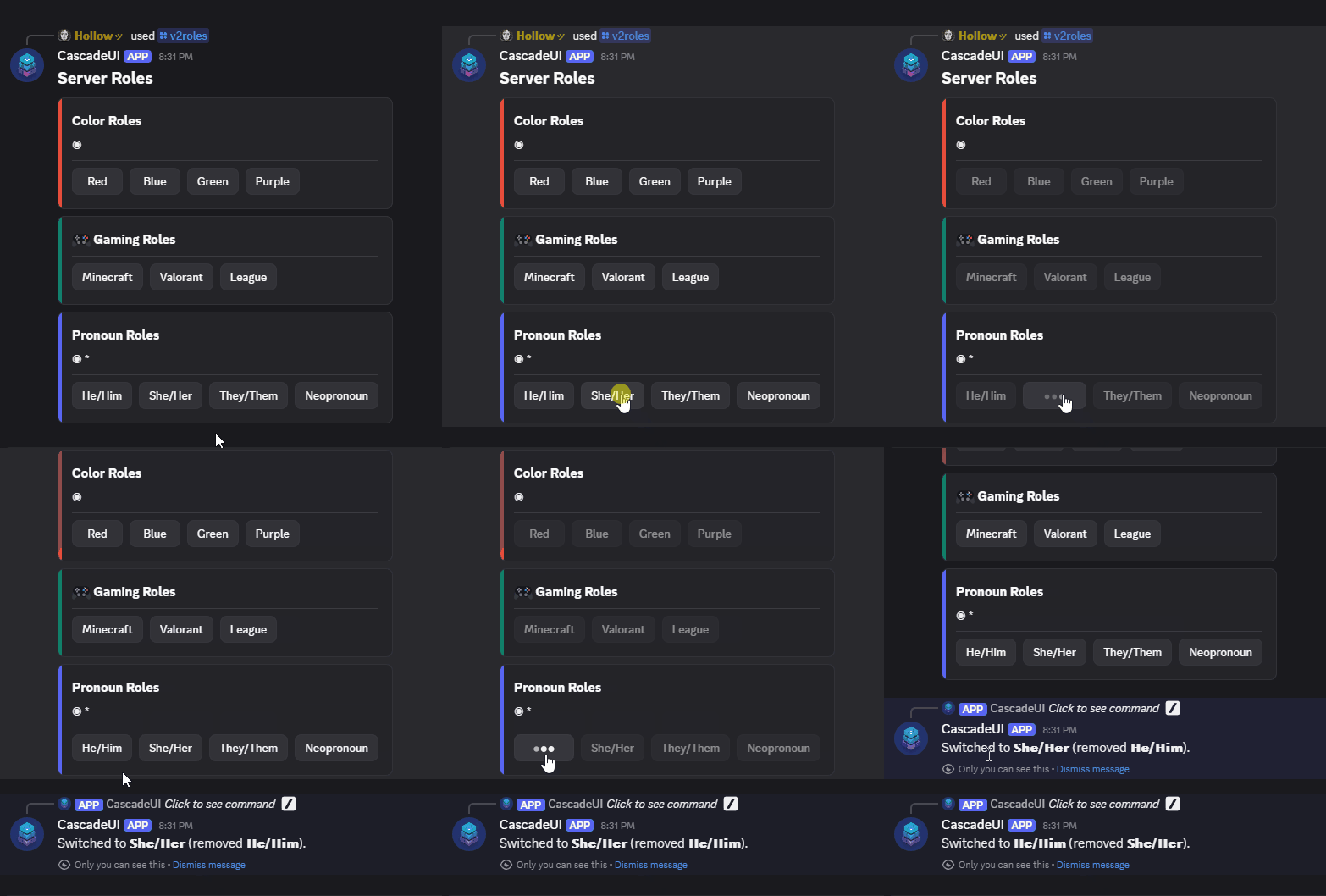
Underneath, each role button is a DynamicPersistentButton subclass
declared once at module import. Clicks route by custom_id template
match, so a panel with 50 roles across 6 categories tracks zero
per-button state and survives bot restarts cleanly. A member's second click
on a role while their first is still being applied is dropped, so a
double-click changes the role once.
Minimal example
import discord
from cascadeui import PersistentRolesLayoutView, RoleCategory


class ServerRoles(PersistentRolesLayoutView):
    categories = [
        RoleCategory(
            name="Color Roles",
            roles={"Red": 101, "Blue": 102, "Green": 103, "Purple": 104},
            exclusive=True,
            color=discord.Color.red(),
        ),
        RoleCategory(
            name="Gaming Roles",
            icon="🎮",
            roles={"Minecraft": 201, "Valorant": 202, "League": 203},
            color=discord.Color.dark_teal(),
        ),
        RoleCategory(
            name="Pronoun Roles",
            roles={"He/Him": 301, "She/Her": 302, "They/Them": 303, "Neopronoun": 304},
            exclusive=True,
            required=True,
            color=discord.Color.blurple(),
        ),
    ]
    title = "Server Roles"


view = ServerRoles(
    context=context,
    persistence_key=f"roles:{context.guild.id}",
)
await view.send()
Cardinality model
Two orthogonal boolean flags on RoleCategory control cardinality:
exclusive=True-- at most one role in this category may be active. Selecting another role removes the previously-active one in the same category first (swap). Useful for color roles, pronouns, team affiliation.required=True-- at least one role in this category must stay active. Removing the last role in the category is rejected. Useful for pronoun / region / team categories where "no selection" is not a meaningful state.
The four combinations (both false / one-or-the-other / both true) all produce valid cardinality behavior:
exclusive |
required |
Behavior |
|---|---|---|
False |
False |
Free multi-select. Any combination of roles in the category can be active, including none. |
True |
False |
Radio button. One role at a time; unchecking is allowed (zero active is valid). |
False |
True |
Required checkbox. Any number of roles active, but at least one. |
True |
True |
Required radio. Exactly one role active; removing the last is rejected. |
Class attributes
Heading:
- title (default "Server Roles") -- H2 rendered above all
categories. Set to None to skip entirely.
- subtitle (default None) -- optional H3 rendered below the
title. Set to a string to render (the subtitle uses raw text, so
users can prefix with "-# " for small-text style).
Mode hints (rendered as small text under each category heading):
- hint_normal (default None) -- hint for free-multi-select
categories.
- hint_exclusive (default "◉") -- hint for exclusive-only
categories. U+25C9 fisheye, a text-size filled circle.
- hint_required (default "*") -- hint for required-only
categories.
- hint_exclusive_required (default "◉ *") -- hint for
exclusive+required categories. Both indicators render at
text-size so they sit on one line at consistent visual weight,
rather than mixing an emoji glyph with a text character.
Each hint attribute accepts any string (including emoji), or None
to suppress the hint entirely; anything else raises TypeError when the
class is defined, as do title and subtitle. Per-category dynamic hints
override format_category_hint(category) at Tier 2.
Response messages (Python str.format placeholders: {role},
{category}, {removed}, {error}):
- assigned_message -- sent after a role is added.
- removed_message -- sent after a role is removed.
- required_message -- sent when a required-category last-role
removal is rejected.
- swap_message -- sent after an exclusive-mode swap.
- role_error_message -- sent on role mutation failure (forbidden,
HTTP error).
Each template is checked at class definition against its placeholders --
a typo ({roel}) or an unbalanced brace raises ValueError naming the
attribute and the placeholders it accepts, rather than a bare KeyError
from inside the click that renders it.
Override hooks
Classmethod hook signature
Hook methods on RolesLayoutView / PersistentRolesLayoutView
use @classmethod with a cls first argument, not self. The
dispatch path routes through DynamicPersistentButton which has
no view instance at click time -- the hook classmethods read
class attributes (cls.assigned_message, etc.) and respond to
the interaction directly. A hook that sends its own reply uses the
module-level respond_safe(interaction, ...) helper
(from cascadeui import respond_safe), the is_done()-aware
responder for these no-self contexts. super() calls work normally.
| Hook | Purpose |
|---|---|
format_category_title(category) |
Category heading line. Default: f"### {category.name}" (or prefixed with category.icon when set). |
format_category_hint(category) |
Hint rendered below the heading. Default: routes to hint_* attribute based on the cardinality flags. Return None to skip. |
format_button_label(role_name, role_id, category) |
Button label. Default: role_name. |
format_button_emoji(role_name, role_id, category) |
Button emoji. Default: None. |
format_button_style(role_name, role_id, category) |
Button style. Default: category.button_style or ButtonStyle.secondary. |
build_category_card(category) |
Render one category as a Container. Default composes the smaller format_* hooks; override for full layout control. |
on_role_assigned(interaction, member, role, category) |
Called after a role is added without a swap. Default: reads assigned_message, sends ephemeral response. |
on_role_removed(interaction, member, role, category) |
Called after a role is removed. Default: reads removed_message. |
on_role_swap(interaction, member, role_added, roles_removed, category) |
Called after an exclusive-mode swap. Default: reads swap_message with {removed} formatted as a comma-joined list of removed role names. |
on_role_required_block(interaction, member, role, category) |
Called when a required-category last-role removal is rejected. Default: reads required_message. |
on_role_error(interaction, error) |
Called on role mutation failure (discord.Forbidden, discord.RateLimited, discord.HTTPException, a transport failure, or role-not-found string). Default: reads role_error_message. |
The five format_* hooks compose the role card inside the synchronous build_ui, so they must be plain defs; an async def override is refused at class definition. The on_role_* hooks respond after the role mutation and accept either def or async def.
Tier 1 customization (class attributes)
Every visible string is customizable without a method override:
class CustomRoles(PersistentRolesLayoutView):
    categories = [...]

    title = "🎨 Pick Your Roles"
    subtitle = "-# Click any button to toggle."

    hint_exclusive = "🎯 pick one"
    hint_required = "⚠️ required"

    assigned_message = "✅ Added **{role}**."
    removed_message = "➖ Removed **{role}**."
    required_message = "You need at least one **{category}** role."
Tier 2 customization (method overrides)
Override the smallest format hook that carries the tweak you need:
class EmojiRoles(PersistentRolesLayoutView):
    categories = [...]

    @classmethod
    def format_button_emoji(cls, role_name, role_id, category):
        emoji_map = {"Red": "🟥", "Blue": "🟦", "Green": "🟩"}
        return emoji_map.get(role_name)
For richer hook behavior (logging, embeds, conditional responses),
override the on_role_* classmethods:
class AuditedRoles(PersistentRolesLayoutView):
    categories = [...]

    @classmethod
    async def on_role_assigned(cls, interaction, member, role, category):
        await super().on_role_assigned(interaction, member, role, category)
        audit = interaction.guild.get_channel(AUDIT_CHANNEL_ID)
        if audit:
            await audit.send(f"{member} took {role.name}")
Persistent variant
PersistentRolesLayoutView composes _PersistentMixin with
RolesLayoutView. Defaults: owner_only = False,
exit_policy = "disable", timeout = None. Requires
persistence_key= at construction. On bot restart, role buttons
continue routing correctly because each button is a
DynamicPersistentButton subclass registered globally at module
import -- the panel survives restart independent of view
re-attachment. The default on_restore re-renders the message
from the current categories on every restart, so source-code
edits to role IDs, category names, or button labels propagate to
the displayed message on the next bot start. Unchanged panels
pay zero Discord API cost: refresh()'s render-hash short-circuit
skips the PATCH when the rebuilt tree matches what the message
already shows.
Category name uniqueness
Category names must be globally unique across every
RolesLayoutView subclass in the process. The pattern registers
each category's slugified name in a module-level registry at class-
definition time; collisions raise ValueError immediately so the
error surfaces at import rather than at click time. If two panels
need similar category names, prefix them (e.g. "ServerA Colors" /
"ServerB Colors").
Common Patterns
Cross-Step State
Wizard and form patterns store collected values on self -- state
survives across steps naturally:
class CharacterWizard(WizardLayoutView):
    def __init__(self, *args, **kwargs):
        self.character_data = {}
        steps = [
            {"name": "Name", "builder": self.build_name_step},
            {"name": "Class", "builder": self.build_class_step},
        ]
        super().__init__(*args, steps=steps, **kwargs)
Dynamic Page Content
Paginated views support dynamic data via refresh_data() for views
created with from_data():
async def _on_refresh(self, interaction):
    fresh_items = await fetch_items_from_db()
    await self.refresh_data(fresh_items)
For cursor-mode views (from_cursor()), call refresh_pages() or
refresh_pages(new_total=N) instead:
async def _on_refresh(self, interaction):
    # Contents changed, row count did not
    await self.refresh_pages()

async def _on_insert(self, interaction):
    # Rows added; resize the pages list
    new_total = await db.fetchval("SELECT count(*) FROM users")
    await self.refresh_pages(new_total=new_total)
refresh_pages() fetches the page on screen again and re-renders it at
once; other pages are fetched as they are visited. It waits for a
reload() already fetching rather than rendering beside it (see
Navigating database-backed views).
Do not name these reload. reload() is the library's own seam
(on_load() then refresh()), it takes no positional argument, and it is
called internally by the deferred-refresh replay, by persistent
on_restore, and by the composite re-render probe. An override taking
interaction shadows it, and every one of those internal calls raises
TypeError on the missing argument.
Combining Patterns with Navigation
Patterns work with push() and pop() like any other view, and each carries
its own cursor back: a popped paginated view returns to the page the user
left, tabs to the open tab, a wizard to its step, and a form with the values
already typed. See
What a pop restores for
the boundary and how to carry your own state across it.