DevTools
CascadeUI includes built-in developer tools for inspecting and managing
state at runtime. Two entry points: a /cascadeui command group for
quick CLI-style operations, and a visual InspectorView for interactive
exploration.
Recommended dev-bot setup
A minimal bot layout for local development. Enables debug logging, an
in-memory persistence backend so views survive reloads within a session,
and the DevToolsCog so /cascadeui inspect is available from the
first run:
import discord
from discord.ext import commands

from cascadeui import (
    DevToolsCog,
    InMemoryBackend,
    PersistenceMiddleware,
    setup_logging,
    setup_middleware,
)


class DevBot(commands.Bot):
    def __init__(self):
        super().__init__(
            command_prefix="!",
            intents=discord.Intents.all(),
        )

    async def setup_hook(self):
        setup_logging(level="DEBUG")
        await setup_middleware(
            PersistenceMiddleware(backend=InMemoryBackend(), bot=self),
        )
        await self.add_cog(DevToolsCog(self))


DevBot().run("YOUR_BOT_TOKEN")
Swap InMemoryBackend for SQLiteBackend("cascadeui.db") when you need
persistence across restarts.
At DEBUG, a click the library answers without running its callback logs
one line naming the view, the control's custom_id, and the reason: the view
has closed, the control is disabled on screen or is no longer on the message
(the click came from an earlier render), the click repeats one still being
handled (a double-click, a second Finish or Submit, a role button still
toggling, a second Continue), or the view's access check or the control's own
owner_only refused the user who clicked. That is the line to look for when a
button seems to do nothing.
When to enable tracing
setup_logging() accepts a trace=True flag that installs a wrapper
around discord.py's ViewStore. It dumps the full dispatch table
whenever a click resolves to a component whose view reference is already
gone, the path discord.py otherwise discards silently, and adds
per-rebuild lines for custom_id stabilization and item restoration.
Successful routing produces no output. This is useful when a specific
symptom appears:
- A button click produces no response and no error in the normal logs.
- A
PersistentViewfails to re-attach on restart and you want to see whichcustom_ids the dispatcher is looking for. - A modal submission seems to be routed to the wrong view.
The tracer is quiet while routing succeeds and loud on rebuilds and
misses, so a view that rebuilds on every state change still produces
enough volume to bury a typical debug session. Leave trace=False
during general development and flip it on only when chasing a routing
question. Turn it back off once the symptom is resolved.
Customizing log output
setup_logging() accepts colors= and template= to control the console
appearance. Pass a preset name ("ocean", "forest", "minimal") or a
ColorScheme / FormatTemplate instance for full control, and a
JSONFormatter as file_formatter= for machine-readable file logs:
from cascadeui import setup_logging, ColorScheme, JSONFormatter

setup_logging(
    colors=ColorScheme(info="\x1b[36;1m"),   # cyan info lines
    template="minimal",                       # preset name, or a FormatTemplate instance
    file_formatter=JSONFormatter(),           # structured JSON file output
)
All four types import from the package root. Because logging runs through the
async queue, a JSONFormatter used as file_formatter= folds a traceback into
the message field rather than a separate exception key; its docstring notes
the synchronous-handler workaround if you need the structured key.
DevToolsCog
Add the cog in setup_hook:
from cascadeui import DevToolsCog

class MyBot(commands.Bot):
    async def setup_hook(self):
        await self.add_cog(DevToolsCog(self))
This registers the /cascadeui hybrid command group. All subcommands
are owner-only -- the is_owner() check on the group propagates to
every subcommand automatically.
The group also sets default_member_permissions to none, so Discord hides
the /cascadeui slash commands from non-admin members in the command picker.
Discord has no owner-only visibility, so this restricts the picker to admins;
is_owner() still blocks execution, and the prefix form (!cascadeui ...)
stays available to the owner in a guild where they are not an admin.
DevToolsCog carries is_owner_tool = True. A bot that routes owner-only
cogs differently (syncing them to a control guild so they never reach a
member's slash picker, for example) reads getattr(cog, "is_owner_tool",
False) to detect the cog instead of matching its class name. Your own
owner-gated cogs can carry the same marker so one check covers them all.
/cascadeui Commands
Core (lifecycle + visual inspector)
| Command | Description |
|---|---|
/cascadeui inspect [scope] |
Open the visual state inspector, scoped to the current guild; pass a guild id or global to widen it (see below) |
/cascadeui views |
List active views in the current guild with live/ghost status indicators |
/cascadeui exit <id> |
Exit a specific view by ID (partial match, 8+ chars) |
/cascadeui exitall |
Exit live views in the current guild and clean their ghost state entries |
/cascadeui sessions |
List active sessions in the current guild with view counts and nav depth |
/cascadeui clear <id> |
Clear a session -- exits all views and removes the entry |
/cascadeui flush |
Force an immediate persistence write to disk |
/cascadeui purge |
Remove stale component and modal interaction entries |
/cascadeui reset |
Reset the entire state store (requires confirm:True) |
Registry introspection
| Command | Description |
|---|---|
/cascadeui persistent |
List registered PersistentView classes (module.QualName keys) |
/cascadeui unreachable [prune_older_than_days] |
List registry rows that could not be reached and how long each has been that way; with the argument, prune the aged ones after re-checking each against Discord |
/cascadeui scoped [slot] |
Inspect a scoped bucket under state["application"] (default slot: scoped); groups keys by scope kind |
/cascadeui computed [name] |
List @computed registrations with cache-primed status; pass a name to force a read |
/cascadeui middleware |
List installed middleware in dispatch order |
Diagnostics
| Command | Description |
|---|---|
/cascadeui history [n] |
Show the most recent n dispatched actions (clamped to store.history_limit) |
/cascadeui perf [action] |
Toggle perf sampling: on, off, clear, status |
/cascadeui trace [action] |
Toggle ViewStore dispatch tracing: on, off, status |
/cascadeui subscribers |
List active state subscribers with action-filter breakdown |
exit supports partial ID matching -- pass the first 8+ characters of
a view ID. If the view is live, it calls exit() for a clean shutdown.
If only a ghost state entry remains (no live instance), the entry is
cleaned up directly.
reset is a destructive operation that exits all views, clears the
state dict via StateStore._build_initial_state(), invalidates every
@computed cache, and drops all subscriber selector memoization. It
requires confirm:True as a parameter to prevent accidental use.
InspectorView
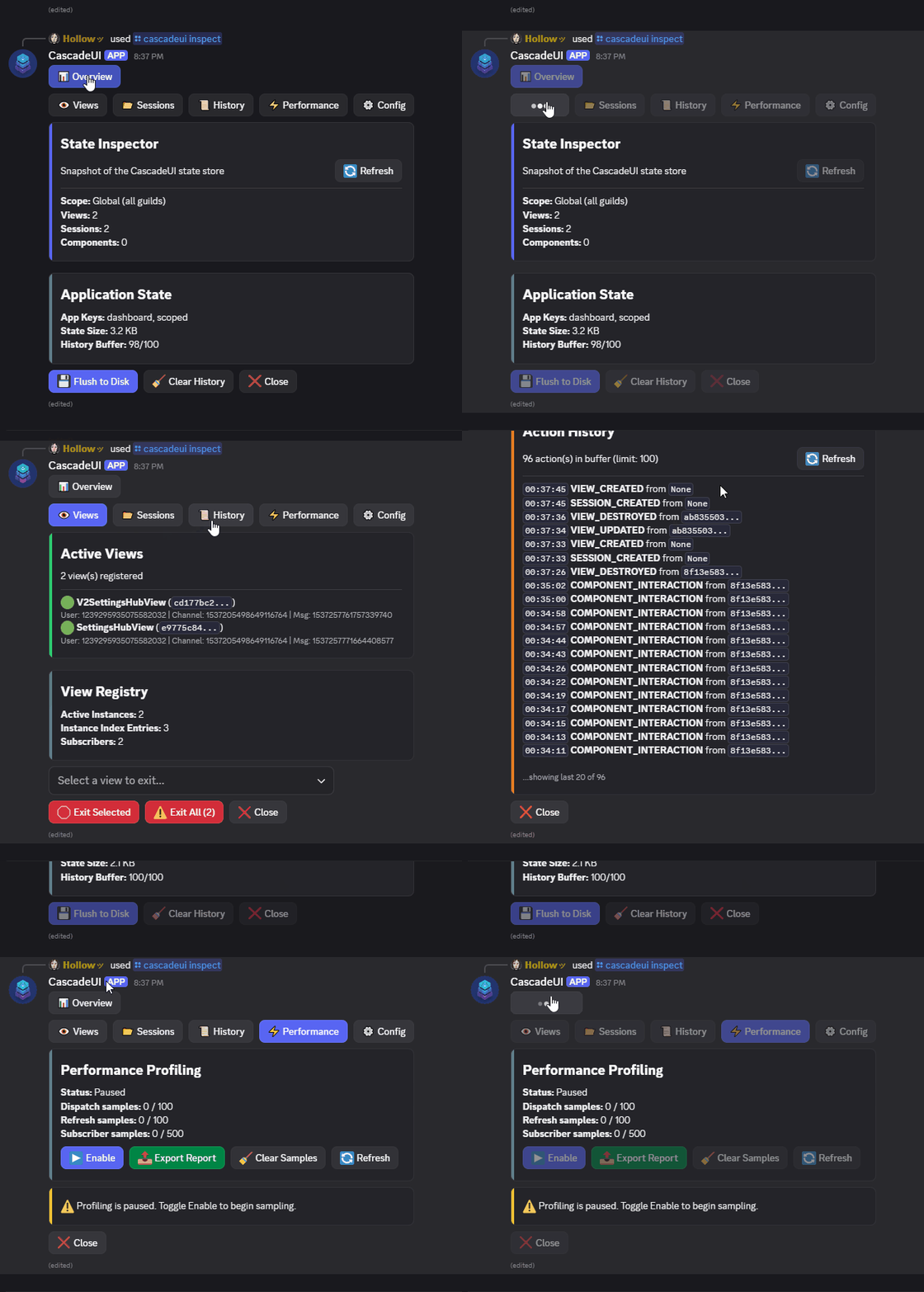
The visual inspector is a TabLayoutView with six tabs. It uses
CascadeUI's own V2 component system (card(), key_value(),
action_section(), alert(), divider()) and stays within
Discord's 40-component limit by rendering lists as markdown inside
single TextDisplay components.
Overview Tab
A high-level summary of the state store:
- Active view count, session count, tracked component count
- Application state top-level keys
- Total state size in KB, history buffer usage
Interactive controls:
| Button | Action |
|---|---|
| Purge Stale | Remove orphaned component/modal entries |
| Flush to Disk | Force an immediate persistence write |
| Clear History | Clear the action history buffer |
Views Tab
Lists every view currently registered with the store:
- View type (class name), view ID (truncated)
- User ID, channel ID, message ID
Up to 8 views per page. A registry stats card shows active instance count, instance index entries, and subscriber count.
Interactive controls:
| Control | Action |
|---|---|
| Select menu | Choose a view by type and ID |
| Exit Selected | Exit the selected view (clean shutdown or ghost cleanup) |
| Exit All | Exit all registered views at once |
Sessions Tab
Lists active user sessions:
- Session ID (e.g.,
MyView:user_123) - View count, navigation stack depth, creation timestamp (UTC)
Up to 6 sessions shown.
Interactive controls:
| Control | Action |
|---|---|
| Select menu | Choose a session by ID |
| Clear Selected | Exit all views in the session and remove the entry |
History Tab
Shows the last 20 dispatched actions in reverse chronological order:
- Timestamp (HH:MM:SS UTC), action type, source view ID (truncated)
Click Refresh to see the latest actions during active debugging.
Config Tab
Shows the current store configuration across three cards:
- Reducers -- core (built-in) and custom (via
@cascade_reducer) - Middleware & Hooks -- middleware pipeline names, hook count, computed value count
- Persistence -- enabled/disabled with backend type and persistent view count. Card is green when active, red when disabled.
Performance Tab
Opt-in profiling for dispatch, subscriber, and refresh timings. Disabled by default -- click Enable to begin recording samples, then interact with views in another channel.
Interactive controls:
| Button | Action |
|---|---|
| Enable / Disable | Toggle profiling on/off |
| Export Report | Download full raw samples as a markdown file attachment |
| Clear Samples | Drop every recorded sample |
| Refresh | Re-render the tab with the latest samples |
The tab itself shows aggregated percentiles and top-N subscribers to stay within Discord's component and message limits. Export Report produces a complete snapshot (every dispatch, every subscriber timing, and every refresh sample) as a markdown file with a trailing JSON appendix, delivered as an ephemeral attachment. Attach the file to a bug report or review comment when a screenshot's summary data is not enough.
See Performance for the full breakdown of what each metric means and how to use selectors to reduce subscriber fan-out.
Scope and Filtering
By default the inspector shows only the views and sessions in the guild
where /cascadeui inspect ran. Pass a scope argument to widen or
retarget it: a guild id for a specific guild, or global (or all) for
every guild. View and session state rows carry a guild_id field that
drives this filtering. Run in a DM (no executing guild) and the default
is global; under a guild scope, DM-originated rows (no guild_id) are
excluded. The views, sessions, and exitall text commands share this
executing-guild default.
The inspector also excludes every inspector (its own and any others open in other guilds) from the displayed data, so opening one never adds an entry to the Views or Sessions tabs:
| Displayed data | Excludes |
|---|---|
| View rows | Every InspectorView row, and rows outside the guild scope |
| Session rows | Inspector sessions, and sessions outside the guild scope |
| History entries | Actions whose source is this inspector |
| Active view registry | This inspector's live instance |
Live Auto-Refresh
The inspector subscribes to the view, navigation, and session lifecycle actions. When another view is created, updated, navigated, or destroyed, the inspector automatically refreshes its active tab.
Its state_selector returns the identity set of the filtered views and
sessions, not their counts. A push or a pop births one view and destroys
another, so the count is unchanged across an action that changed everything
on screen. Copy the identity approach, not a
count, for any dashboard that watches a set it does not own.
Direct Use
InspectorView is a regular TabLayoutView subclass. Create it
directly without the cog:
Debugging Tips
- View not updating? Check the History tab to confirm the action was dispatched, then Config to verify the reducer is registered.
- Stale views accumulating? The Views tab shows live vs ghost
status. Use Exit All or
/cascadeui exitallto clean up. - Session issues? The Sessions tab shows view counts and nav stack depth -- compare against expectations.
- Middleware not running? The Config tab lists the middleware pipeline in registration order. Verify your middleware appears and is positioned correctly.
- Inspector shows stale data? Views and Sessions tabs auto-refresh on lifecycle events. History and Config have manual Refresh buttons.