Home
A state management and UI framework for discord.py bots. Views read from one store, changes flow through dispatched actions and reducers, and the UI rebuilds itself. The architecture that runs large web frontends, adapted to Discord's component system.
A working view
Ownership, instance limits, and state-driven rebuilds, in twenty lines:
import discord
from discord.ui import ActionRow
from cascadeui import StatefulButton, StatefulLayoutView, card

class Counter(StatefulLayoutView):
    owner_only = True       # only the opener can click
    instance_limit = 1      # one live counter per user

    count = 0

    async def on_load(self):
        self.build_ui()

    def build_ui(self):
        self.clear_items()
        self.add_item(card(f"Count: **{self.count}**"))
        self.add_item(ActionRow(StatefulButton(
            label="+1",
            style=discord.ButtonStyle.primary,
            callback=self.increment,
        )))

    async def increment(self, interaction):
        self.count += 1
        self.build_ui()
        await self.refresh()
from discord.ext import commands

@bot.hybrid_command()
async def counter(ctx):
    await Counter(context=ctx).send()
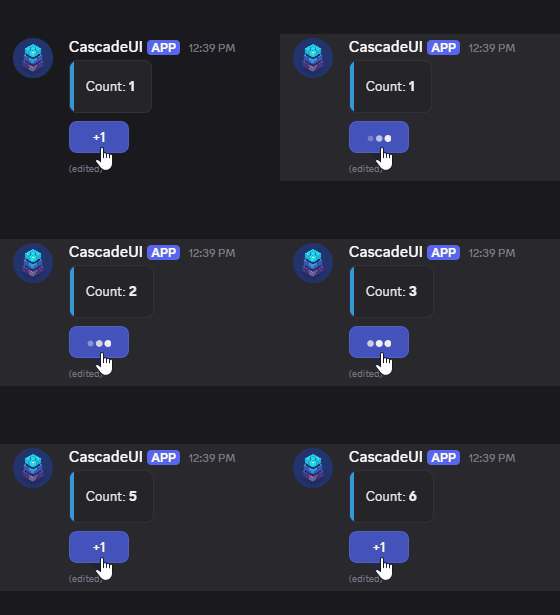
That is the whole thing. No manual message.edit(), no tracking who opened
what, no interaction.response branching. The next step is moving count out
of the view and into the store, which is where cross-view reactivity,
persistence, and undo come from.
Why
Interactive Discord UIs get hard to manage as they grow. State accumulates
across View attributes, components stop responding after a restart, multi-step
forms lose data between pages, and sharing anything between views means manual
plumbing in every callback.
- One source of truth. Views read from a central store instead of their own attributes, so two views showing the same data cannot disagree.
- One way to change it. Dispatched actions and reducers, so a state change has a single path and a single place to read it.
- Patterns instead of one-offs. Menus, pagination, forms, wizards, tabs, and persistent panels are library primitives, not things you rebuild per project.
- Interaction control by declaration. Ownership, instance limits, participant caps, and navigation stacks are class attributes rather than checks you remember to write.
- Persistence that survives restarts. SQLite and PostgreSQL backends, opt-in per slot, with views that re-attach to their Discord messages after a restart.
Start here
- Install it and verify the import.
- Build the counter above, then move its state into the store.
- Add a pattern -- pagination or a form is usually the second thing a real bot needs.
From there, Core Concepts covers the mental model and Examples has eighteen runnable cogs, from a counter to a full Battleship game.
Data flow
Every UI change follows the same path:
User clicks button
       │
  Interaction dispatched
       │
  Callback runs → dispatch(action)
       │
  Middleware pipeline (logging, persistence, undo)
       │
  Reducer transforms state
       │
  Subscribers notified (filtered by action + selector)
       │
  on_state_changed() → refresh() → UI updated
When it earns its keep
Even a single panel benefits from owner_only = True and instance_limit = 1.
The same framework scales to shared state across views, real persistence,
multi-step flows with validation, navigation stacks, and grid-based game boards.
Requirements
- Python 3.10+
- discord.py 2.7+
Support
- Discord Server -- help, discussion, and updates
- GitHub Issues -- bug reports and feature requests