Components
CascadeUI components extend discord.py's built-in UI components with state dispatching, validation, and composition helpers. They fall into three tiers based on how they interact with the state store -- see Core Concepts -- Component Tiers for the tier-by-tier overview, and Core Concepts -- Extension Strategies for the subclass / builder / wrapper / pattern taxonomy that governs how each section below is built.
Interactive Components
These fire COMPONENT_INTERACTION actions on every click or selection.
StatefulButton
Extends discord.ui.Button with automatic state dispatching:
from cascadeui import StatefulButton

button = StatefulButton(
    label="Click Me",
    style=discord.ButtonStyle.primary,
    callback=my_handler,
)
The callback takes one positional argument, the interaction, sync or async.
A button carries no value, so a callback declaring a required second
parameter (or an unbound method still carrying self) raises TypeError
at construction, printing the signature it saw, instead of failing with a
bare arity error on the first click. See
Callbacks and control values for the rule the
value-carrying controls follow.
In V2 views, buttons must be wrapped in ActionRow:
from discord.ui import ActionRow

self.add_item(ActionRow(
    StatefulButton(label="Save", callback=self.save),
    StatefulButton(label="Cancel", callback=self.cancel),
))
Convenience subclasses: PrimaryButton, SecondaryButton, SuccessButton,
DangerButton, ToggleButton. LinkButton sits beside them but wraps
discord.ui.Button directly, since Discord opens the URL client-side and no
interaction is dispatched: it takes no callback and no owner_only.
ToggleButton is the one value-carrying member: its callback may declare a
second parameter ((interaction, toggled)) to receive the post-flip state,
matching toggle_button and toggle_section.
owner_only=True per-button host gate
Pairs with view-level owner_only=False to express open-view + host-only-button
flows (lobby Start/Disband, ticket Close, poll End). When set, the button
callback fires only when interaction.user.id == view.user_id; mismatches
route through view.on_unauthorized(interaction) without invoking the
callback.
from discord.ui import ActionRow

from cascadeui import StatefulLayoutView, StatefulButton

class LobbyView(StatefulLayoutView):
    owner_only = False  # everyone in the channel can see the lobby

    def build_ui(self):
        self.clear_items()
        self.add_item(ActionRow(
            StatefulButton(label="Join", callback=self.join),
            StatefulButton(
                label="Start",
                callback=self.start,
                owner_only=True,  # only the lobby host
            ),
        ))
Anonymous views (no view.user_id) skip the gate entirely so background
or system-driven flows still work. Defaults to False, so omitting the
kwarg leaves the standard callback contract unchanged.
StatefulSelect
Extends discord.ui.Select with state integration:
from cascadeui import StatefulSelect

select = StatefulSelect(
    placeholder="Pick one...",
    options=[
        discord.SelectOption(label="Option A", value="a"),
        discord.SelectOption(label="Option B", value="b"),
    ],
    callback=my_handler,
)
Specialized variants: Dropdown (adds option-dict shorthand), RoleSelect,
ChannelSelect, UserSelect, MentionableSelect.
set_selected(value) / get_selected()
Programmatic state reflection for selects:
# Set which options are marked as default
select.set_selected("a")             # Single value
select.set_selected(["a", "b"])      # Multiple values (max_values > 1)
select.set_selected(None)            # Clear all selections

# Read current selections
selected = select.get_selected()     # Returns list[str]
Values that don't match any existing option are silently ignored, so state-driven rebuilds survive config migrations.
Two-Parameter Callbacks
StatefulSelect callbacks may accept an optional second parameter values:
async def on_select(interaction, values):
    selected = values[0]  # list[str] of selected option values
    ...
This is one instance of a rule that holds across the whole component
surface: a callback receives the interaction, plus the control's value as
a second argument when the control carries one and the callback declares a
second parameter. A select's value is values; ToggleButton,
toggle_button, and toggle_section deliver the new toggle state;
cycle_button and choice_row always report their value, so their
callbacks must take both parameters. Value-less buttons
(StatefulButton, action_section, button_row, confirm_section,
tab_nav) pass the interaction alone.
Detection happens at creation time via inspect.signature. Single-parameter
callbacks still work unchanged, and variadic (*args) callbacks keep the
one-argument contract. A callback whose signature cannot accept what the
control will call it with raises TypeError at the builder line, printing
the signature back, rather than a bare arity error on the first click.
Pre-populated defaults (specialized selects)
RoleSelect, UserSelect, ChannelSelect, and MentionableSelect
each accept a default_values= constructor kwarg that pre-marks
entries as selected when the message first renders. CascadeUI accepts
raw int IDs, Discord objects (Role, Member, User, GuildChannel), or
pre-built discord.SelectDefaultValue instances, and wraps each entry
with the right type for the select class.
from cascadeui import RoleSelect, UserSelect, MentionableSelect

# Raw int IDs (auto-typed as 'role')
moderator_select = RoleSelect(default_values=[123456789, 987654321])

# Discord.Member objects (auto-typed as 'user')
admin_select = UserSelect(default_values=[ctx.guild.owner])

# MentionableSelect requires typed objects -- bare ints rejected
mention_select = MentionableSelect(
    default_values=[
        ctx.guild.get_role(role_id),       # auto-typed as 'role'
        ctx.guild.get_member(user_id),     # auto-typed as 'user'
    ],
)
Update defaults after construction with set_default_values(values),
which accepts the same input shape and replaces the existing list:
select.set_default_values([new_id_1, new_id_2])
select.set_default_values([])     # clear all defaults
select.set_default_values(None)   # clear all defaults
MentionableSelect cannot infer type from a bare int (could be
either user or role), so raw IDs are rejected with a TypeError
naming the supported input shapes. Callers who only have IDs
construct discord.SelectDefaultValue(id=..., type='user') (or
'role') explicitly and pass that.
Passing Context to Callbacks
Use closures or functools.partial to pass extra data:
def _make_move(self, cell: int):
    async def callback(interaction):
        self.board[cell] = self.current_mark
        self.build_ui()
        await self.refresh()
    return callback

# Each button gets a unique callback with a different `cell`
for i in range(9):
    button = StatefulButton(label=self.board[i], callback=self._make_move(i))
Modal Inputs
Testing a modal without Discord
await modal.submit(interaction, {"Name": "Ada"}) runs the real submit
pipeline offline and returns whether the validators accepted it. See the
API reference.
These live inside Modal dialogs. They carry a custom_id but never fire
COMPONENT_INTERACTION of their own; values are collected by the Modal on
submit. All five share the same contract:
custom_idderived from label viaTextInput._slug()- Optional
validatorslist auto-collected byModal - Value write-back:
.valueor.valuespopulated after validators pass; a rejected submission leaves the wrapper at its pre-submit state - Each renders as a
discord.ui.Labelwrapping the inner input. The label string moves toLabel.text; an optionaldescription=kwarg populatesLabel.descriptionfor a secondary helper line beneath the title. The Modal's child tree carries theui.Labelwrappers directly; CascadeUI unwraps them internally during submit collection.
See Validation for the built-in validator catalog --
validators= works the same way on all five wrapper types.
TextInput
Wraps discord.ui.TextInput:
from cascadeui import TextInput

name = TextInput(label="Name", placeholder="Enter your name")
bio = TextInput(label="Bio", style=discord.TextStyle.long)
After submit: name.value → str.
Validators are attached directly:
from cascadeui import TextInput, min_length, regex

name = TextInput(
    label="Username",
    description="Lowercase letters, numbers, and underscores only.",
    validators=[
        min_length(3),
        regex(r"^[a-zA-Z0-9_]+$", "Alphanumeric only"),
    ],
)
The description= kwarg renders as Label.description -- a secondary
helper line beneath the field title. Available on all five wrapped
input types (TextInput, Checkbox, CheckboxGroup, RadioGroup,
FileUpload).
Checkbox
Wraps discord.ui.Checkbox -- a single boolean toggle:
After submit: agree.value → bool.
CheckboxGroup
Wraps discord.ui.CheckboxGroup -- multi-select with labeled options:
from cascadeui import CheckboxGroup

roles = CheckboxGroup(
    label="Preferred Roles",
    options=[
        {"label": "Tank", "value": "tank"},
        {"label": "DPS", "value": "dps"},
        {"label": "Support", "value": "support", "default": True},
    ],
    min_values=1,
    max_values=3,
)
Options accept dict shorthand (shown above) or native
discord.CheckboxGroupOption instances. After submit: roles.values →
list[str].
RadioGroup
Wraps discord.ui.RadioGroup -- single-select with labeled options:
from cascadeui import RadioGroup

difficulty = RadioGroup(
    label="Difficulty",
    options=[
        {"label": "Easy", "value": "easy"},
        {"label": "Normal", "value": "normal", "default": True},
        {"label": "Hard", "value": "hard"},
    ],
)
Same dict shorthand as CheckboxGroup. After submit: difficulty.value →
str.
Counts and bounds are checked at construction
CheckboxGroup accepts 1-10 options; RadioGroup requires 2-10. The same
directed ValueError guards every documented numeric bound at construction:
TextInput min_length / max_length (0-4000 / 1-4000), the min_values /
max_values on CheckboxGroup and FileUpload (0-10 / 1-10), and the
25-option cap on StatefulSelect / Dropdown. Each mistake surfaces where
the component is built, not as an HTTP 400 when the modal opens or the
message ships.
FileUpload
Wraps discord.ui.FileUpload:
After submit: upload.values → list[discord.Attachment].
Ephemeral attachment URLs
discord.Attachment objects contain CDN URLs that expire. Read attachment
data in the modal callback -- do not store attachments in the state store.
Modal
Modal collects all wrapped input types and handles submission:
from cascadeui import Modal, TextInput, Checkbox

name = TextInput(label="Name")
agree = Checkbox(label="Agree to terms")

async def handle(interaction, values):
    print(name.value, agree.value)
    # respond() also works after a re-render has answered the submission.
    await self.respond(interaction, "Done!", ephemeral=True)

modal = Modal(title="Registration", inputs=[name, agree], callback=handle)
await self.open_modal(interaction, modal)
Inside a CascadeUI view callback, use self.open_modal() instead of
interaction.response.send_modal(). It handles the case where auto-defer
has already consumed the response slot. See
Opening Modals from Callbacks.
Modal arms an ack backstop before its validators and submit handler run, so a
slow async validator or callback does not drop the submission; auto_defer_delay
(default 2.5s) tunes when that defer fires, and must stay under 3.0, Discord's
acknowledgment deadline. A Modal subclass overriding
on_submit sends replies through self.respond(interaction, ...), which falls
back to a followup when that backstop has already acked.
callback takes (interaction, values), sync or async; a callback that
cannot accept both raises TypeError at construction, since every submission
delivers the collected values. The constructor's signature is closed too: an
unrecognized keyword raises TypeError naming it rather than discarding it
silently. on_submit= is the name discord.py subclasses override and the
natural wrong guess for callback=, and a modal with no handler set
acknowledges every submission and runs nothing. custom_id= is forwarded
to discord.ui.Modal; omit it to let discord.py generate one.
A required TextInput answered with only spaces is refused before its
validators run, naming the field the way a validator failure does: Discord
refuses an empty required box but accepts one of spaces.
After validators pass, each input's .value / .values is populated (a rejected submission leaves them untouched). modal.values_by_input provides a dict keyed by input instance, populated at the same point.
Structured forms and edit-in-place
The wrapped inputs compose freely: one modal can carry a paragraph
field, a pick-one radio, a multi-select checkbox group, and a boolean
flag as a single form. Two composition rules apply -- Discord caps a
modal at 5 top-level inputs, and labels must be distinct because each
input's custom_id derives from its label (duplicates raise at
construction).
import discord
from cascadeui import Checkbox, CheckboxGroup, Modal, RadioGroup, TextInput

REGIONS = ["NA", "EU", "APAC"]
ROLES = ["Tank", "DPS", "Support"]

def build_profile_modal(self) -> Modal:
    bio = TextInput(
        label="Bio",
        style=discord.TextStyle.paragraph,
        default=self.bio or None,
    )
    region = RadioGroup(
        label="Region",
        options=[{"label": r, "value": r, "default": r == self.region} for r in REGIONS],
    )
    roles = CheckboxGroup(
        label="Roles",
        max_values=2,
        options=[{"label": r, "value": r, "default": r in self.roles} for r in ROLES],
    )
    dms_ok = Checkbox(label="Allow DMs", default=self.dms_ok)

    async def on_submitted(interaction, values):
        self.bio = (bio.value or "").strip()
        self.region = region.value or ""
        self.roles = list(roles.values or [])
        self.dms_ok = bool(dms_ok.value)
        self.build_ui()
        await self.refresh()

    return Modal(
        title="Edit Profile",
        inputs=[bio, region, roles, dms_ok],
        callback=on_submitted,
    )
Building each option's default from current state is what makes the
modal edit-in-place: re-opening it shows the form as already saved, so
a submit that changes one field round-trips the rest unchanged.
Factoring the construction into a builder method (as above) keeps the
open callback to one line and lets tests exercise the real modal.
examples/v2_wizard.py runs this shape live: its name modal pairs a
TextInput with an optional FileUpload portrait (the upload replaces
the character's preview image), and its background modal combines all
four structured types in one form.
Validators from all inputs are auto-collected. If any fail, the modal responds with error messages and blocks submission.
Pass view_id=self.id to dispatch a MODAL_SUBMITTED action for state
tracking.
Custom Emoji
CascadeUI accepts the same emoji forms as discord.py everywhere a
component takes an emoji= argument. The type alias EmojiInput
(exported from cascadeui.components.types) is
Optional[Union[str, discord.Emoji, discord.PartialEmoji]] and matches
the union accepted by discord.ui.Button and discord.SelectOption.
Three string forms
| Form | Example | Source |
|---|---|---|
| Unicode | "⚙️" or its Python escape form |
Standard Unicode emoji |
| Custom static | "<:fire:1234567890123456789>" |
Guild-owned or application-owned static emoji |
| Custom animated | "<a:dance:1234567890123456789>" |
Guild-owned or application-owned animated emoji |
discord.py parses all three at the component boundary via
PartialEmoji.from_str. A live discord.Emoji instance (returned by
bot.get_emoji or bot.fetch_application_emoji) and a
discord.PartialEmoji are accepted directly; str(emoji_obj) produces
the matching <:name:id> form when a plain string is required.
Where emoji are accepted
| Surface | Slot |
|---|---|
StatefulButton(emoji=...) |
inherited from discord.ui.Button |
StatefulSelect option dicts |
"emoji" key |
action_section, toggle_section, link_section, button_row, cycle_button, toggle_button |
emoji= kwarg |
confirm_section |
confirm_emoji= / cancel_emoji= |
choice_row |
per option via Choice(emoji=...); the {label: value} dict form has no emoji slot |
MenuView / MenuLayoutView category dicts |
"emoji" key |
RoleCategory(icon=...) |
rendered as a markdown prefix in the category header |
RolesLayoutView / PersistentRolesLayoutView |
format_button_emoji classmethod returns EmojiInput |
LeaderboardLayoutView.podium_emojis |
rank → string used in markdown |
WizardLayoutView |
back_button_emoji, next_button_emoji, finish_button_emoji |
PaginatedLayoutView |
first_button_emoji through last_button_emoji |
FormLayoutView |
text_edit_button_emoji |
with_loading_state(loading_emoji=...) |
wrapper kwarg |
| Refresh handoff (any view) | refresh_button_emoji |
Application-owned emojis
Custom guild emojis only render where the bot is currently a member of the source guild. For bots deployed across many independent guilds, guild-owned assets stop rendering once the bot leaves the guild that owns them. discord.py supports application-owned emojis: emoji uploaded directly to the bot's application, which render everywhere the bot operates and never expire on guild membership changes.
# One-time setup. Run once, capture the IDs in config.
import discord

bot = discord.Client(intents=discord.Intents.default())

@bot.event
async def on_ready():
    with open("fire.png", "rb") as f:
        emoji = await bot.create_application_emoji(name="fire", image=f.read())
    print(f"Created: {emoji} (id={emoji.id})")
    await bot.close()

bot.run("TOKEN")
Reference the captured ID in any emoji= slot:
FIRE_EMOJI = "<:fire:1234567890123456789>"  # captured from the setup run

self.add_item(action_section(
    "Activate trial",
    label="Start",
    emoji=FIRE_EMOJI,
    callback=self._start,
))
Client.fetch_application_emojis() lists existing application emojis
and fetch_application_emoji(emoji_id) retrieves one by ID. Both
return discord.Emoji instances; the rendering pipeline treats them
identically to guild emojis.
Pitfalls
- Missing angle brackets. Typing
":fire:1234567890123456789"instead of"<:fire:1234567890123456789>"parses as a unicode emoji name and renders as literal text. - Short emoji IDs fall through to unicode. discord.py's parser requires 13 to 20 digits for the ID portion of a custom emoji string. Real Discord snowflakes are 17 to 19 digits. Anything shorter is treated as a unicode emoji name and renders as literal text -- this catches shortened placeholder values copied without substitution.
- Wrong emoji ID. Discord renders unknown IDs as a placeholder glyph; no exception is raised. Verify IDs match a real emoji in the source guild or application.
- Bot not in source guild. A guild-owned custom emoji string only renders when the bot is currently a member of the guild that owns the emoji. Application emojis avoid this entirely.
- Animated flag. Static custom emoji use
<:name:id>with no leadinga. Animated use<a:name:id>. Mismatching the flag against the actual asset shows a static frame.
V2 Builder Functions
Convenience functions for building V2 component trees. All return standard discord.py components.
card(*children, color=None, spoiler=False)
Creates a Container. Strings are auto-wrapped in TextDisplay. Pass
spoiler=True to hide the whole container behind a spoiler overlay.
Raises ValueError when a child is a Container. Discord forbids a Container inside a Container, so card(heading, alert(...)) is never legal -- place the alert as a sibling of the card. alert(), card() and stats_card() are the builders that produce one.
from cascadeui import card

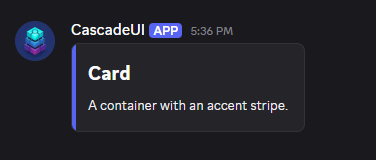
self.add_item(card(
    "## Card",
    "A container with an accent stripe.",
    color=discord.Color.blurple(),
))
key_value(data)
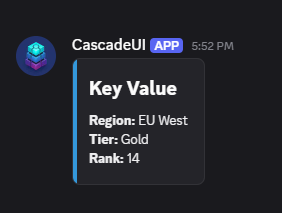
Converts a dict to a formatted TextDisplay:
from cascadeui import card, key_value

self.add_item(card("## Key Value", key_value({"Region": "EU West", "Tier": "Gold", "Rank": 14})))
# key_value renders: **Region:** EU West\n**Tier:** Gold\n**Rank:** 14
action_section(text, *, label, callback, ...)
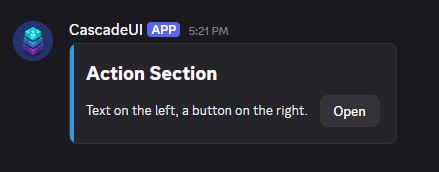
A Section with text and a button accessory. The callback takes the
interaction alone (this button passes no second value; one that demands a
second argument raises TypeError at construction). Pass disabled=True to
render the button greyed out and non-interactive:
from cascadeui import action_section, card

self.add_item(card(
    "## Action Section",
    action_section("Text on the left, a button on the right.", label="Open", callback=self.open),
))
toggle_section(text, *, active, callback, labels=("Enabled", "Disabled"), ...)
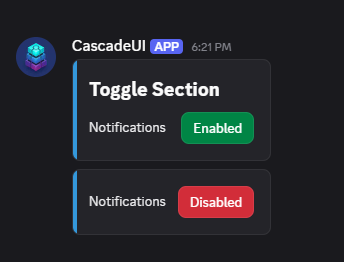
A Section with a green/red toggle button. labels sets the (active, inactive)
button text (pass ("On", "Off") to relabel), and emoji adds a button emoji.
Pass disabled=True to render the button greyed out and non-interactive:
from cascadeui import card, toggle_section

self.add_item(card(
    "## Toggle Section",
    toggle_section("Notifications", active=self.notify, callback=self.toggle_notify),
))
One section, shown in both states:
The callback takes (interaction) or (interaction, active). The
two-parameter form receives the state the click asks for (the flip of the
rendered active), so the handler assigns it instead of re-deriving it:
async def toggle_notify(self, interaction, active):
    self.notify = active
    self.build_ui()
    await self.refresh()
A callback that can accept neither shape raises TypeError at construction.
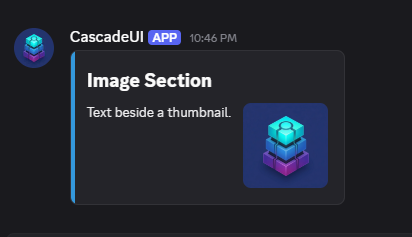
image_section(text, *more_text, url, description=None, spoiler=False)
A Section with a Thumbnail image. url accepts a MediaInput. description sets the thumbnail's alt text (up to
1024 chars); spoiler=True hides it behind a spoiler. See
Local file attachments.
link_section(text, *, label, url, emoji=None, disabled=False)
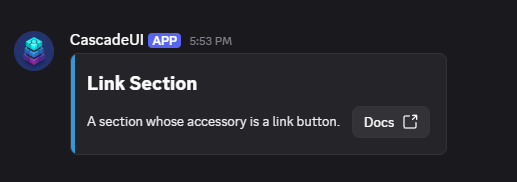
A Section with a link-style button accessory. Completes the *_section
family for the three Section accessory shapes: action (StatefulButton), image
(Thumbnail), and link. Link buttons open a URL directly -- no callback runs
and no interaction fires.
from cascadeui import card, link_section

self.add_item(card(
    "## Link Section",
    link_section(
        "A section whose accessory is a link button.",
        label="Docs",
        url="https://hollowthesilver.github.io/CascadeUI/",
    ),
))
One accessory per Section -- a row cannot carry both a button and an image
Discord gives a Section a single accessory slot, so text with a thumbnail
and a per-row button is not a shape that exists. The three builders above
are alternatives, not ingredients. Two layouts get close, and which one
fits depends on how many rows a page holds:
- Keep the thumbnail inline with
image_section, and put onechoice_rowunder the list keyed to the visible rows. Number the rows in their text and label the options to match. This is the cheaper layout and the one that scales: the control costs the same whether the page holds four rows or twenty, and it becomes a dropdown on its own pastbutton_threshold. Passallow_reselect=Truewhen picking a row performs an action rather than setting a selection, or the last-picked option renders disabled. - Keep the button inline with
action_section, and render the image full width throughgallery()above or below. The image no longer reads as belonging to that row, which is usually the reason the first layout wins.
A button per row is possible (image_section followed by its own
ActionRow), but it costs five components per row against the
40-per-message budget, so a page holds eight such rows before
add_item refuses the tree -- fewer once the page carries any other
chrome (a header, a nav row, an exit button).
confirm_section(text, *, on_confirm, on_cancel, ...)
Returns a [TextDisplay, ActionRow] list rather than a single component so
the caller can splat it into card(...). The paired success/danger buttons
run the supplied callbacks, each taking the interaction alone (one that
demands a second argument raises TypeError at construction):
from cascadeui import card, confirm_section

self.add_item(card(
    "## Confirm Section",
    *confirm_section(
        "Delete this panel?",
        on_confirm=self._do_delete,
        on_cancel=self._do_cancel,
    ),
))
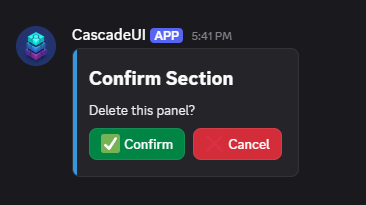
Defaults: confirm is green with a check emoji, cancel is red with a cross
emoji, which suits a constructive prompt. A destructive one like the delete
above wants the styles swapped (confirm_style=discord.ButtonStyle.danger,
cancel_style=discord.ButtonStyle.secondary), or the button that deletes
renders green beside a red one that does nothing. Override any of
confirm_label, cancel_label, confirm_emoji, cancel_emoji,
confirm_style, cancel_style when the defaults read wrong for the action.
alert(message, *, level="info")
A colored status container:
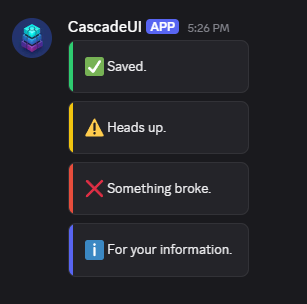
| Level | Color |
|---|---|
"success" |
Green |
"warning" |
Gold |
"error" |
Red |
"info" |
Blue |
stats_card(title, stats, *, color=None, footer=None, spoiler=False)
Thin composition of card(title, key_value(stats), ...). The title is
rendered as a second-level heading automatically (pre-format with ## for
finer control), a small separator sits between the heading and the stats,
and an optional footer line renders in Discord's subtext style. An empty
title renders no heading and no separator, so a computed title that comes
back blank degrades to a bare stats card:
from cascadeui import stats_card

self.add_item(stats_card(
    "Season Stats",
    {"Wins": 24, "Losses": 7, "Streak": "5W"},
))
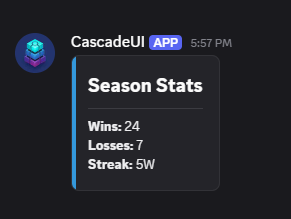
When color is omitted, the active theme's accent_colour is used
automatically inside a view's build_ui().
progress_bar(value, max_value, *, width=20, ...)
Text-based progress bar returned as a TextDisplay. V2 equivalent of the V1
ProgressBar composite. Renders [████████████░░░░░░░░] 60% by default with
Unicode block glyphs. value is clamped to [0, max_value] so callers do
not need to guard against overshoots.
from cascadeui import card, progress_bar

self.add_item(card("## Progress Bar", progress_bar(7, 10)))  # [██████████████░░░░░░] 70%
The same bar at three values:
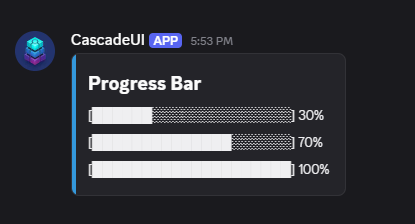
Override filled / empty for alternative glyphs, or set
show_percent=False to drop the trailing percentage.
When the bar belongs inside text rather than beside it, reach for
render_progress, which returns the same bar as a string:
from cascadeui import render_progress

def format_secondary(self, rank, user_id, stats):
    bar = render_progress(stats["wins"], stats["games"] or 1, width=6)
    return f"{stats['mmr']} MMR  {bar}"
progress_bar builds its TextDisplay from this, so a bar inlined in a row
and a bar standing on its own always render identically. Both clamp value
to [0, max_value] and hold the bar to width cells, which a hand-rolled
"█" * count does not.
divider() and gap(large=False)
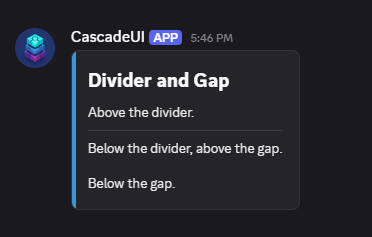
divider() creates a thin line separator. gap() creates spacing without a
visible line.
gallery(*media, descriptions=None, spoilers=None)
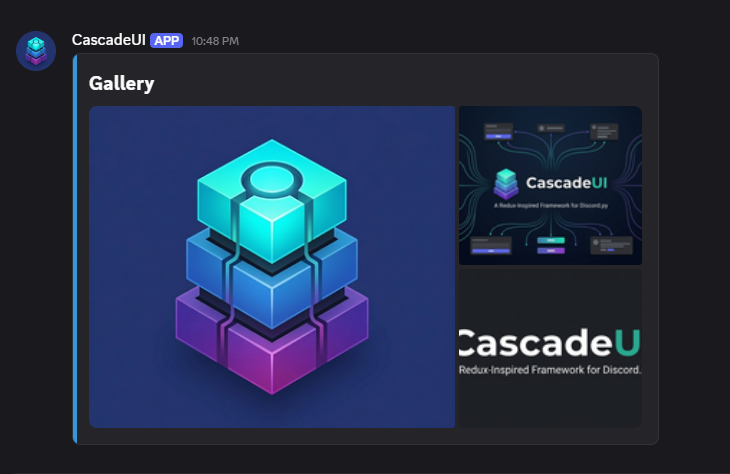
A MediaGallery from one or more image references. Each reference is
a MediaInput. See
Local file attachments for the send-time pairing.
file_attachment(url, *, spoiler=False)
A File component for inline attachment display. Takes the same
MediaInput as the builders above -- a remote URL, the
attachment://name.ext form, a discord.File, or any object with a
string .url:
from cascadeui import card, file_attachment

card(
    "## Quarterly Report",
    file_attachment("attachment://q1_2026.pdf"),
    "Released April 15.",
)
Use file_attachment for downloadable files; use gallery for inline image previews.
button_row(buttons, *, style=..., emoji=None, custom_id=None)
Builds an ActionRow from a {label: callback} mapping. Dict insertion
order determines button order, so every button in the row shares one style
and emoji:
from cascadeui import button_row

self.add_item(button_row({
    "First": self._first,
    "Second": self._second,
    "Third": self._third,
}))
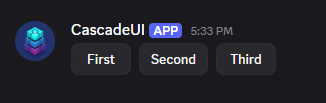
Raises ValueError if the mapping is empty or exceeds Discord's
5-buttons-per-row limit, and TypeError when a callback demands a second
argument (these buttons pass no value; use choice_row when the callback
needs to know which option was picked). For per-button customization, build
the ActionRow by hand.
choice_row(options, *, on_select, selected=None, multi=False, ...)
A "pick one" (or "pick any") control. Where button_row gives N buttons
each with its own callback and no notion of a current selection,
choice_row gives N options that share one on_select and tracks which is
active: the active option renders highlighted, and in single-select it is
also disabled so re-picking it is a no-op. Pass a {label: value} dict for
the common case, or a list of Choice when an option needs an emoji or a
dropdown description:
from cascadeui import choice_row

# inside your StatefulLayoutView.build_ui():
self.add_item(choice_row(
    {"Easy": Difficulty.EASY, "Normal": Difficulty.NORMAL, "Hard": Difficulty.HARD},
    selected=self.difficulty,
    on_select=self._set_difficulty,   # async (interaction, value) -> None
))
When the option count outgrows a button row (more than button_threshold,
default 5), choice_row renders a dropdown instead:
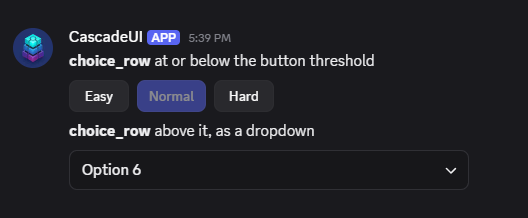
The dropdown runs up to Discord's 25-option select limit (exported as
MAX_SELECT_OPTIONS), past which choice_row raises. Discord requires select
option values to be strings; the builder maps to and from that form, so
on_select always receives the real Python value, never a stringified index.
on_select takes (interaction, value) -- the pick rides every click, so a
one-parameter callback raises TypeError at construction.
Set multi=True to let several options be active at once. selected is
then read as a collection of active values rather than one, the buttons
become toggles (no disabled state, since an active option must be
clickable to turn it off), and on_select receives the full list of
selected values. A Choice.value may be any Python object, including an
unhashable one like a list or a dict. Ids are derived from what each option
does, so two choice_row controls in one ordinary view need no custom_id=;
inside a PersistentLayoutView, where ids must survive a restart, give each
control a distinct one.
Single-select disables the active option because re-picking it is normally a
no-op. When re-picking is a real action (the callback reopens the active
option's editor, say), pass allow_reselect=True to keep the active option
clickable so a re-pick fires on_select again. The flag applies to both the
button and dropdown forms, so the behavior stays the same on either side of
button_threshold.
The host owns the selection -- rebuild after on_select
choice_row is stateless: it reads selected at build time and renders
the active option(s) from it. Your on_select callback must store the new
value and rebuild the row: build_ui() then refresh(), or a state
dispatch that triggers on_state_changed. Without a rebuild, the control
snaps back to the build-time selection on the next click.
Tip
Reach for a raw StatefulSelect when you need custom min_values /
max_values, or a select type other than text (role, user, channel).
choice_row covers the common "pick from a fixed set of values" shape.
cycle_button(*, values, on_change, ...)
A button that cycles through a fixed list of values. The button tracks its
own index on the returned instance (button._cycle_index); clicking
advances to the next value (wrapping) and updates the label before the
on_change callback runs:
from cascadeui import cycle_button

async def _range_changed(interaction, value):
    self.report_range = value
    self.build_ui()
    await self.refresh()

self.add_item(ActionRow(cycle_button(
    values=["Daily", "Weekly", "Monthly"],
    on_change=_range_changed,
)))
One button, shown here at each position in that cycle so the label change is visible:
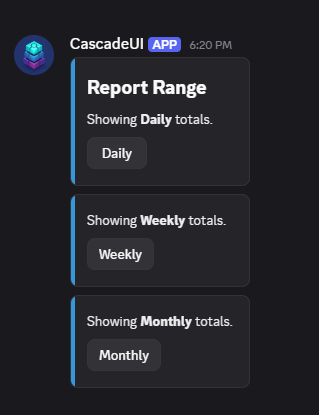
The callback receives the new value (post-advance), so it takes
(interaction, value); a one-parameter callback raises TypeError at
construction. Optional labels= customizes the display strings, start=
picks the initial index.
toggle_button(*, active, on_toggle, ...)
Standalone boolean toggle button. Distinct from toggle_section, which
wraps the same button shape in a Section with display text on the left.
Use toggle_button when the button stands alone in an ActionRow:
from cascadeui import toggle_button

async def _notifications(interaction, active):
    self.notify = active
    self.build_ui()
    await self.refresh()

self.add_item(ActionRow(toggle_button(
    active=self.notify,
    on_toggle=_notifications,
)))
The default labels are ("Enabled", "Disabled"), green when active and red
when not. Both states, side by side:
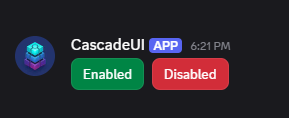
The button flips its own state (button._toggle_active) and calls
on_toggle(interaction, new_state) with the post-flip value; a
one-parameter callback raises TypeError at construction. Style and
label swap automatically between the active/inactive pair.
tab_nav(tabs, *, active=None, ...)
Lighter alternative to TabLayoutView for views that want tab-style
navigation without the full Tab pattern's lifecycle (async builders,
on_tab_switched, refresh contract). Each tab is just a button the view
handles in its own callback:
from cascadeui import tab_nav

self.add_item(tab_nav(
    {
        "Overview": self._show_overview,
        "Members": self._show_members,
        "Settings": self._show_settings,
    },
    active="Overview",
))
tab_nav returns the row alone. The panel below it is whatever the active
callback renders, which is the part your view owns:
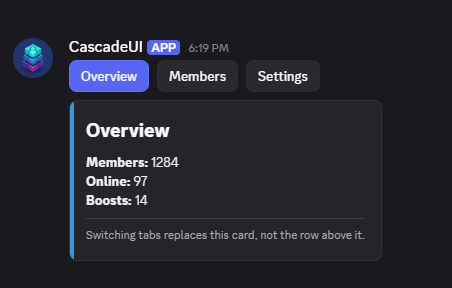
The tab matching active renders with active_style (primary by default);
all others render with inactive_style (secondary). If active is
omitted, the first tab is marked active. Each tab callback takes the
interaction alone; one that demands a second argument raises TypeError at
construction. Capped at Discord's 5-per-row limit -- use TabLayoutView
for views that need more tabs.
Local file attachments
V2 builders that take a media reference (gallery, image_section,
file_attachment, and LeaderboardLayoutView's banner=) accept four
input shapes, together typed as
MediaInput:
- A remote URL (
"https://cdn.example.com/img.png") - The
attachment://<filename>reference scheme, when the file travels with the message as adiscord.File - A
discord.Fileinstance directly -- the builder reads its.uriproperty and emits the sameattachment://<filename>reference - Any object carrying a string
.url, which covers everydiscord.Asset, somember.display_avatarworks wheremember.display_avatar.urlwas meant
Anything else raises TypeError where the builder is called, naming the
builder and the argument that carried it. An empty or whitespace-only
reference raises ValueError at the same seam: Discord cannot resolve a
media item with no URL, so the mistake would otherwise surface as an
HTTP 400 at send naming neither the builder nor the argument. The one
exception is banner=, where a blank value normalizes to None and
renders no banner -- absence is a banner's documented meaning.
The reference and the bytes are independent: the builder emits the
reference into the component tree; the discord.File carries the bytes
to Discord.
Both halves must travel together
An attachment://<filename> reference inside a builder is meaningless
on its own. The matching discord.File must reach the same payload
via view.send(files=[...]) (initial send) or
view.refresh(attachments=[...]) (in-place edit), or Discord renders
the reference as an unresolved placeholder. send() logs a WARNING
naming every unmatched reference, since the initial send is the only
seam where both halves are in scope to compare.
Initial send
StatefulView.send() and StatefulLayoutView.send() accept file=
(singular) and files= (sequence) for the initial upload:
import discord
from cascadeui import StatefulLayoutView, card, gallery

class GalleryView(StatefulLayoutView):
    def __init__(self, *, photo_uri: str, **kwargs):
        super().__init__(**kwargs)
        self.add_item(card("## Gallery", gallery(photo_uri)))

photo = discord.File("assets/photo.png")
view = GalleryView(context=ctx, photo_uri=photo.uri)
await view.send(files=[photo])
Mixing file= and files= raises TypeError from discord.py at the send
boundary. If the send fails before the bytes reach Discord, the library
closes the supplied file handles as part of its rollback so callers do
not leak file pointers.
Fetching remote assets
For attachments sourced from a URL (avatars, CDN-hosted images, attachment
proxy URLs), cascadeui.fetch_as_file() absorbs the standard
aiohttp GET + BytesIO + discord.File construction:
from cascadeui import fetch_as_file

photo = await fetch_as_file(
    ctx.author.display_avatar.url,
    "avatar.png",
)
await view.send(files=[photo])
Pass a shared session= for any command that fetches multiple URLs so
the requests share one TCP pool:
import aiohttp

async with aiohttp.ClientSession() as session:
    photo_a = await fetch_as_file(url_a, "a.png", session=session)
    photo_b = await fetch_as_file(url_b, "b.png", session=session)
await view.send(files=[photo_a, photo_b])
A URL that answers with an error status raises
aiohttp.ClientResponseError instead of handing back the error page as the
file. A body larger than max_bytes (100 MiB by default, the most Discord
accepts from a bot) raises ValueError, and the read stops once the count
passes the limit, so such a body is never read in full; pass
max_bytes=interaction.guild.filesize_limit to refuse anything the current
server would reject.
fetch_as_file forwards spoiler= and description= to the
discord.File constructor, so attachment metadata travels through the
helper without an extra wrapper. See examples/v2_attachments.py for a
runnable four-command walkthrough.
Mid-session attachment swaps
view.refresh() forwards arbitrary kwargs to the underlying
message.edit() call, so a swap goes through the standard attachments=
parameter -- a replacement list, not additive. Pair it with build_ui()
so the component tree rebuilds against the new reference at the same
time the new bytes ship:
class GalleryView(StatefulLayoutView):
    def __init__(self, *, photo_uri: str, **kwargs):
        super().__init__(**kwargs)
        self._photo_uri = photo_uri
        self.build_ui()

    def build_ui(self):
        self.clear_items()
        self.add_item(card("## Gallery", gallery(self._photo_uri)))

    async def swap_photo(self, new_photo: discord.File):
        self._photo_uri = new_photo.uri
        self.build_ui()
        await self.refresh(attachments=[new_photo])
build_ui() clears the tree and re-adds the rebuilt card; refresh()
ships the new component bytes plus the replacement attachments in a
single edit. attachments= replaces the message's complete attachment
list -- previously-attached files not present in the new list are
removed. Use an empty list (attachments=[]) to clear all attachments
without uploading new ones.
The example above passes one file because the tree holds one reference.
That is the bound: the list belongs to the
message, so it needs a file for every attachment:// reference the tree
currently holds, not only the one that changed. A view showing four
images passes four; pass one and the other three render as permanent
loading placeholders, with no exception raised anywhere. The files sent
earlier can be passed again: every send and edit the library makes reads
a file from its start. A direct discord.py call such as
channel.send(file=...) does not, so pass it a new discord.File each time.
Paged or tabbed content is where this bites, because the reference that breaks is the one you are navigating to. Under Discord's ten-attachment ceiling the simpler shape is to upload everything once:
files = [await fetch_as_file(url, f"page_{i}.png") for i, url in enumerate(urls)]
await view.send(files=files)     # every page's bytes, once
...
await view.refresh()             # page turns: omit attachments entirely
An edit that does not mention attachments= keeps whatever is already
attached, so each page's reference resolves for as long as the message
lives. Past ten attachments, use remote URLs in gallery() instead.
Persistent views
PersistentLayoutView and PersistentView survive bot restarts.
attachment:// references already present in the persisted component
tree resolve from Discord's stored copy of the original upload -- the
bytes survive as long as the message itself does, so no re-upload is
required at restart.
References introduced after restart (inside on_restore or any later
rebuild) need a matching discord.File passed through
refresh(attachments=[...]); otherwise Discord renders the reference as
unresolved.
Composing V2 layouts
A V2 view is a tree, and most layout questions reduce to one thing: what nests inside what. The allowed shape is small enough to hold in your head, and only two nestings are ever illegal.
The nesting tree
LayoutView (the view)
  - Container  (a card)         the main grouping block
      - TextDisplay             markdown text
      - Section                 text + one accessory (button or thumbnail)
      - ActionRow               buttons OR one select
      - MediaGallery            1-10 images
      - File                    a downloadable file
      - Separator               a divider or gap
  - ActionRow                   (also valid at the top level)
  - Section                     (also valid at the top level)
  - MediaGallery / File / TextDisplay / Separator
The two surprising illegal nestings are: a Container cannot hold another
Container, and a Section cannot hold another Section. The rest follow
type logic -- a bare Button or Select needs an ActionRow, and a
Thumbnail belongs only as a Section accessory.
What goes where
- Top level (the view): Containers (cards), ActionRows, Sections,
MediaGalleries, Files, TextDisplays, Separators. A bare
Button,Select, orThumbnailis not valid at the top level -- it must live inside anActionRow(buttons/selects) or aSection(thumbnail). - Inside a card (
Container): everything the top level accepts except another card. Text, sections, action rows (which may wrap a select), galleries, and dividers all nest inside a card. - Inside an
ActionRow: up to 5 buttons, or exactly one select -- not both. - Inside a
Section: one to threeTextDisplaychildren plus one accessory (a button or a thumbnail).
Selects and choice_rows belong inside cards
A card accepts ActionRows, and a choice_row is an ActionRow (buttons, or
a single select), so a dropdown belongs inside the card it relates to, not
stranded as a separate row below it. A raw StatefulSelect drops in the same
way once wrapped in an ActionRow -- choice_row does that wrapping for you:
self.add_item(card(
    "## Filters",
    key_value(self._summary()),
    choice_row(LEAGUES, selected=self.league, on_select=self._pick),  # inside the card
))
Reveal a region inside a card
Because Collapsible.render() and PaginatedRegion.controls() return raw
components rather than a pre-wrapped card, you choose where they land. Splat
them into a card() and the revealed region expands inside the card:
def build_ui(self):
    self.clear_items()
    self.add_item(card(
        "## Filters",
        key_value(self._summary()),
        *self.league_picker.render(self),   # trigger + reveal, inside the card
    ))
The single caveat is the Container-in-Container rule: a reveal callable
must not return a card when you splat it into a card. choice_rows,
sections, and text are all fine -- each is either an ActionRow or a
Container-legal child.
The rules below spell out every constraint and how CascadeUI's pre-flight validator enforces them.
V2 Placement Rules
Discord's V2 component system has strict rules about which component types
can nest inside which. discord.py only enforces a small subset of those rules
at construction time -- the rest are enforced by Discord's API server when
send() runs, returning HTTP 400 with terse error text far from the
construction site. CascadeUI's V2 builders sidestep this entire problem
because each builder hardcodes a known-safe shape, and an opt-out send-time
validator catches violations in any tree built outside the builders.
What discord.py enforces at construction
- V1
Viewrejects V2 items (TextDisplay,Container,Section, etc). Sectionallows at most 3 children.Sectionrequires anaccessory=kwarg.ActionRowrejects a sixth child, and a select added after a button. A select added first counts as one unit, so buttons after it still fit; see the send-time table below.add_itemrejects non-Item, non-str types.
Everything else passes construction silently. Discord rejects the message
when you call send().
What Discord enforces at send time
| Composition | discord.py | Discord API |
|---|---|---|
Section accessory must be Button or Thumbnail |
accepts | rejects |
Section children must all be TextDisplay |
accepts | rejects |
Container children must be ActionRow, TextDisplay, Section, MediaGallery, File, or Separator |
accepts | rejects |
| Containers cannot nest | accepts | rejects |
| Sections cannot nest | accepts | rejects |
Standalone Button / Select / Thumbnail at LayoutView top level |
accepts | rejects |
ActionRow children must be Button or Select |
accepts | rejects |
Thumbnail outside a Section accessory slot |
accepts | rejects |
Label / TextInput / RadioGroup / CheckboxGroup / Checkbox / FileUpload at any LayoutView position |
accepts | rejects (Modal-only) |
Container must hold at least 1 child (empty) |
accepts | rejects |
Section must hold 1-3 children (empty) |
accepts (empty) | rejects |
ActionRow must hold at least 1 child (empty) |
accepts | rejects |
ActionRow holds a Select beside anything else |
accepts when the select comes first | rejects |
MediaGallery must hold 1-10 items |
accepts | rejects |
TextDisplay content over 4000 characters |
accepts | rejects |
TextDisplay content is empty |
accepts | rejects |
SelectOption label or value is empty |
accepts | rejects |
Thumbnail / MediaGalleryItem / File media URL is empty |
accepts | rejects |
Link-button url is empty |
accepts | rejects |
custom_id over 100 characters |
accepts | rejects |
Button label over 80 characters |
accepts | rejects |
Button url over 512 characters |
accepts | rejects |
Select placeholder over 150 characters |
accepts | rejects |
SelectOption label / value / description over 100 characters |
accepts | rejects |
Thumbnail / MediaGalleryItem description over 1024 characters |
accepts | rejects |
Two components share a custom_id |
accepts | rejects (code 50035) |
Builders are guardrails
Routing through CascadeUI's V2 builders sidesteps every rule in the table above. Each builder hardcodes a Discord-API-valid shape:
card()always produces a top-levelContainerwith valid children.image_section()always producesSection(TextDisplay, accessory=Thumbnail).action_section()/toggle_section()/link_section()always produceSection(TextDisplay, accessory=Button-variant).button_row()always producesActionRow(Button, Button, ...)capped at 5.choice_row()always produces oneActionRow(buttons or aStatefulSelect), capped at 5 buttons / 25 options.gallery()/file_attachment()always produce a properly-wrapped media component.
A user who composes views entirely from builders cannot construct a tree
Discord rejects (size limits aside). The escape hatch is dropping to raw
discord.ui primitives -- where the validator below picks up the slack.
Pre-flight validation
Every V2 view (StatefulLayoutView and subclasses) gets a placement
validator that runs before every Discord round-trip. Three seams call
it: the initial send (_send_pipeline), every state-driven refresh()
after the render-hash short-circuit, and the in-place edits emitted by
push() / pop() navigation. Mid-session shape changes (Wizard step
swaps, Form section toggles, Tab body rebuilds) get caught at the
seam instead of surfacing as terse HTTP 400 from message.edit().
When the assembled component tree contains a composition Discord would
400 on, the validator raises a clear ValueError naming the violation
node, the path through the tree, and the suggested fix:
ValueError: Invalid V2 placement: Container cannot be a child of Container.
  Path: MyDashboard -> Container[0] -> Container[0]
  Discord rejects this composition with HTTP 400.
  Fix: Containers cannot nest. Move the inner Container's children up to
       the outer Container, or split into a separate top-level Container.
The path uses bracket indices on each segment so the offending node is unambiguous when the same type appears multiple times at the same depth.
Skipped refreshes (the render-hash digest matches the previous send) bypass validation entirely -- nothing changed, the previous send already validated the tree. The cost on every other refresh is one linear walk over the component tree, microseconds for typical views.
Duplicate custom_ids
Discord also rejects a message whose component tree contains two
components with the same custom_id (HTTP 400, code 50035). This is a
uniqueness rule, not a placement one, so it runs for every view (V1
StatefulView as well as V2) and is not governed by validate_placement.
The same three seams walk the tree and raise a directed ValueError
naming the repeated id:
ValueError: Duplicate component custom_id: 'region_page_next' appears more than once in ConfigView.
  Discord rejects this message with HTTP 400 (code 50035: component custom id cannot be duplicated).
  Fix: Give each component a distinct custom_id. A builder used more than once needs a distinct
       key= (PaginatedRegion, Collapsible), or in a persistent view a distinct custom_id=
       (choice_row, button_row, tab_nav).
Auto-generated ids never collide here: CascadeUI derives them before
send from what each button does, so a click sent from a screen that has
since changed reaches a button only if it would still do the same thing,
and is otherwise acknowledged and dropped. The label is part of what a
button does, so a label that changes between renders (a vote count) gives
the button a new id, and a click from the render before is dropped too; a
custom_id= keeps those clicks. Only caller-supplied ids repeat, most often a
builder called twice with its default key (PaginatedRegion,
Collapsible).
Modal applies the same rule to its inputs at construction: two inputs
whose labels derive the same custom_id raise immediately rather than
silently overwriting each other at submit.
Checking the component budget
The 40-component cap is discord.py's own enforcement at add_item, not
the pre-flight validator's -- a tree can never exist over the limit, so
there is nothing for the validator to catch. To check a budget before
composing, read view.total_components (a live recursive count) and
count_components(item) (what a subtree would add) against
MAX_MESSAGE_COMPONENTS, all exported from the package root:
from cascadeui import MAX_MESSAGE_COMPONENTS, count_components

if view.total_components + count_components(card) > MAX_MESSAGE_COMPONENTS:
    card = trimmed_card()
view.add_item(card)
from cascadeui.testing import stub_client supplies an offline
discord.Client for measuring a pattern whose composition depends on one
-- a section-mode leaderboard row renders four components with a client
bound and one without, so a test built with no client under-measures the
real budget. See validate() for the full
recipe.
Opting out
Set validate_placement = False on the view class for a documented escape
hatch:
class MyDashboard(StatefulLayoutView):
    validate_placement = False  # tree uses a composition Discord accepts
                                # that the built-in validator rejects
The recommended use case is narrow: the validator's matrix lags a Discord
or discord.py update. Any other reason to opt out signals an actual
placement bug. Prefer fixing the tree. validate_placement = False
disables only the placement matrix; the duplicate-custom_id check is a
separate, always-on guard and still runs.
Grid Helpers
Two helpers for building grid-based UIs:
emoji_grid(rows, cols, *, fill="⬛", row_labels=None, col_labels=None, corner=None, cell_sep=" ")
Returns an EmojiGrid -- a live TextDisplay subclass that rewrites its
content on every mutation:
from cascadeui import emoji_grid

grid = emoji_grid(3, 3, fill="⬜", row_labels="numeric", col_labels="alpha")
grid[(0, 0)] = "❌"                    # Set a single cell
grid[(1, 1)] = "⭕"
grid.fill_rect((2, 2), (2, 2), "❌")   # Fill a rectangle
grid.clear()                           # Reset every cell back to fill
The grid after the three writes, before the clear():
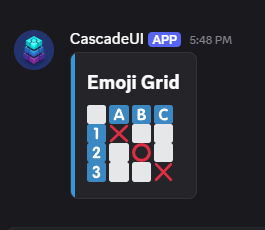
The grid scales to any size Discord's 4000-character text limit allows, which
emoji_grid checks at construction. v2_battleship.py renders two ten-by-ten
fleets this way.
Retained Mode vs Immediate Mode
EmojiGrid supports two usage patterns:
Retained mode -- mutate cells in place; content auto-rewrites. The grid object holds its own state and each mutation immediately updates the rendered string. Ideal for persistent grids where the board evolves incrementally:
# Battleship pattern: mutate cells, grid auto-renders
grid[(row, col)] = hit_emoji
await self.refresh()  # the grid rewrote its own content; ship the message
The grid rewriting itself is what makes build_ui() unnecessary here, not
what makes the edit unnecessary. Nothing reaches Discord until something
sends it, so a callback that mutates and stops leaves the message showing
the previous board.
Immediate mode -- rebuild from external state each render. The grid is
reconstructed from scratch on every build_ui() call, using external state
as the source of truth:
# Dashboard pattern: rebuild from state
grid = emoji_grid(5, 5, fill="⬛")
for pos, value in self.state_data.items():
    grid[pos] = value
Both are valid patterns. Use retained mode when the grid IS the state; use immediate mode when external state drives the rendering.
Axis Labels
row_labels |
col_labels |
Result |
|---|---|---|
None |
None |
No labels |
"alpha" |
None |
A-Z row labels only |
None |
"numeric" |
1-10 column header only |
"alpha" |
"numeric" |
Both, with corner character |
Presets: "alpha" (regional indicators, max 26) and "numeric" (keycap
emoji, max 10). Custom Sequence[str] also accepted.
Mutation API
| Operation | Example |
|---|---|
| Single cell, by coordinate | grid[(r, c)] = "🔥" |
| Single cell, by flat index | grid[0] = "🟥" (row-major, row * cols + col) |
| Multiple cells | grid[[(0,0), (1,1)]] = "⭐" |
| Rectangle fill | grid.fill_rect((0,0), (2,2), "⬜") |
| Whole row | grid.fill_rect((r, 0), (r, cols - 1), "🟥") |
| Clear all | grid.clear() |
button_grid(rows, cols, cell_factory)
Packs buttons into ActionRow components:
from cascadeui import button_grid

rows = button_grid(3, 3, lambda r, c: StatefulButton(
    label=f"{r}{c}",  # A game board passes the cell's value here instead
    callback=self._make_move(r, c),
))
for row in rows:
    self.add_item(row)
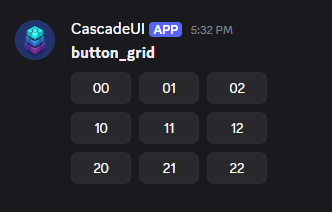
Discord caps at 5 rows × 5 buttons. Both dimensions must be 1-5.
Behavioral Wrappers
Modify component behavior without changing the component:
Wrappers consume the interaction response
All three wrappers attempt to use interaction.response internally (with
an is_done() fallback for auto-defer compatibility). Wrapped callbacks
should use self.respond(interaction, ...) for any replies -- it handles
the response/followup routing automatically.
with_loading_state(component, loading_label="Loading...", loading_emoji=None)
Disables the component and swaps its label while the callback runs.
with_confirmation(component, title="Confirm Action", message="Are you sure?", ...)
Shows an ephemeral yes/no prompt before executing the callback. Labels, styles,
an on_cancel hook, and the prompt timeout are all overridable; the
API reference lists them.
with_cooldown(component, seconds=5, message=None, scope="user", key=None)
Throttles one control for one clicker: per-user (the default), per-guild,
per-user-per-guild, or global. This is the spam guard. refresh_cooldown_ms
looks like one and is not -- it paces a view's background re-renders and exempts
the edits a click asks for, so it would slow every viewer of a shared panel down
without touching the clicking. See
Pacing a Panel vs. Guarding a Button.
def build_ui(self):
    self.clear_items()
    reroll = StatefulButton(label="Re-roll", callback=self._reroll)
    with_cooldown(reroll, seconds=5, message="Wait {remaining}s.")
    self.add_item(ActionRow(reroll))
Wrapping a component the build method rebuilds each render is the expected
shape: deadlines live on the owning view, so they outlive the component they
were recorded on. The deadline is named after the button's custom_id when
you set one, and after the callback otherwise. Controls that end up sharing a
name share a deadline: several buttons wired to one callback, or buttons built
in a loop, whose per-item callbacks all carry the factory's name. Give those a
custom_id= or an explicit key=.
Miss it and the library says so. On a rejected click, if two or more controls
share that defaulted name while calling different callbacks, it logs one
warning per view class naming the count and the fix. Controls deliberately
wired to one callback, and anything with an explicit custom_id= or key=,
stay silent.
Stacked wrappers do not change this: with_cooldown(with_confirmation(button))
still reads the callback you wrote, not with_confirmation's closure, so each
control keeps its own deadline.
V2 Composite Components
A composite component holds state across interactions and lives inside a view, sitting between the two simpler shapes: a builder returns a one-shot tree and forgets it, a view owns the whole message.
PaginatedRegion
Pages one slice of a StatefulLayoutView's tree while the host renders everything else. Reach for PaginatedLayoutView when the page list is the message; reach for PaginatedRegion when one section of a multi-section view needs its own page index while the surrounding layout (a header, other cards, a second list) stays put.
Why PaginatedLayoutView takes a formatter but PaginatedRegion does not
A PaginatedLayoutView owns the whole message, so it needs a formatter to render each page -- there is no other render hook to call. A PaginatedRegion lives inside a host view whose build_ui() or on_load() already renders everything, so it only slices the item list and the host renders the slice alongside the rest of the layout.
from cascadeui import PaginatedRegion, StatefulLayoutView, card, divider, key_value

class StandingsView(StatefulLayoutView):
    def __init__(self, *, standings, **kwargs):
        super().__init__(**kwargs)
        self.region = PaginatedRegion(items=standings, per_page=5)
        self.build_ui()

    def build_ui(self):
        self.clear_items()
        # The header and footer belong to the view and stay put on every page.
        self.add_item(card(
            "## Season 4 Standings",
            key_value({"Region": "EU West", "Bracket": "Ranked", "Updated": "2m ago"}),
        ))
        start = self.region.page * 5 + 1
        rows = "\n".join(
            f"**{start + i}.** {name} • {mmr} MMR • {record}"
            for i, (name, mmr, record) in enumerate(self.region.page_items)
        )
        self.add_item(card(
            f"### Ranks {start}\N{EN DASH}{start + 4}", rows, divider(), *self.region.controls(self),
        ))
        self.add_item(card("-# Header and footer belong to the view. Only the middle card pages."))
        self.add_item(self.make_nav_row(back=False, exit_label="Close"))
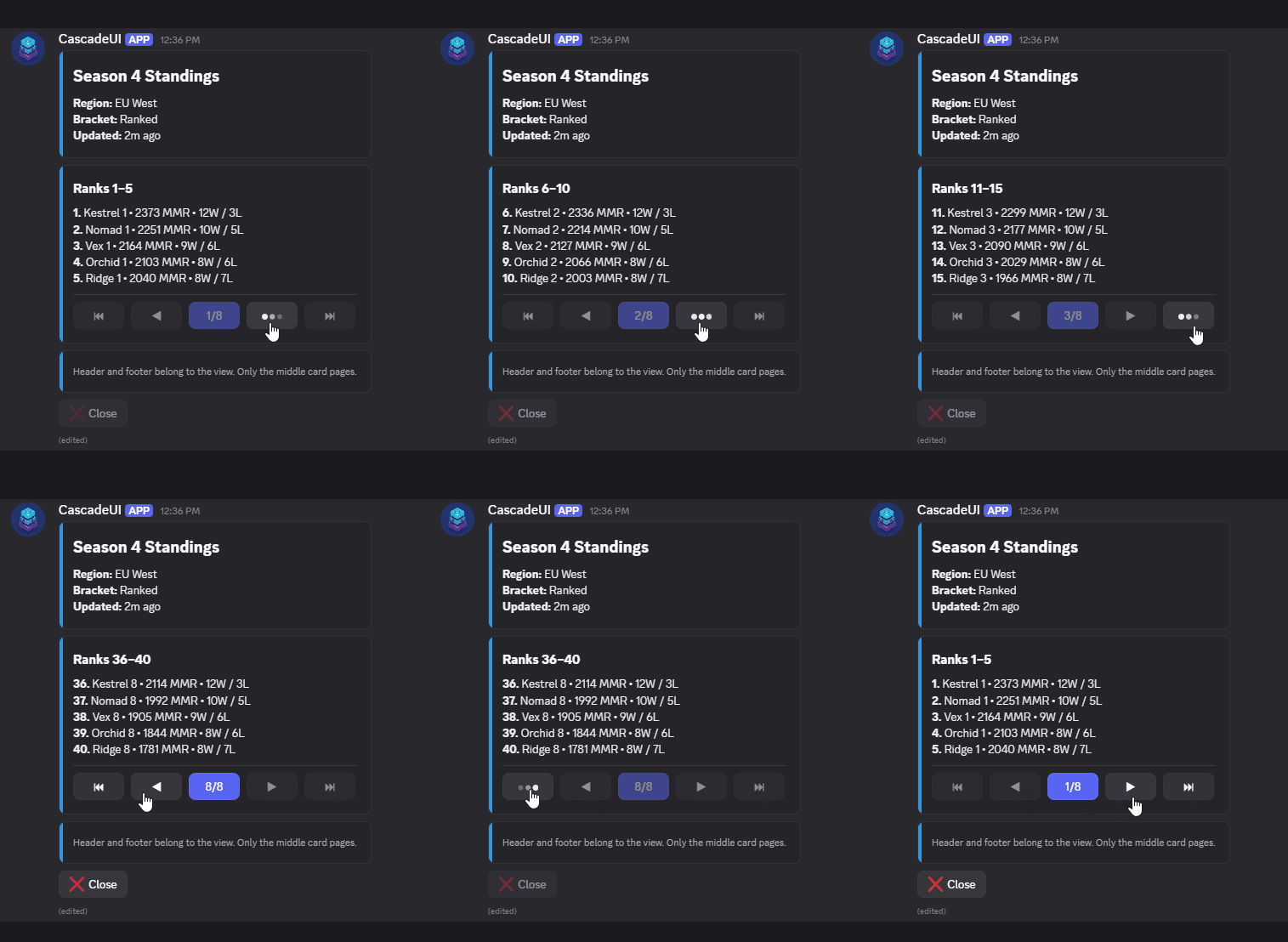
controls(self) captures the host and returns the nav row (empty on a single page). A page click re-runs the host's render path and re-slices. Each region keeps its own page index, so two regions can share a view if you give them distinct key values. Customization mirrors PaginatedLayoutView -- subclass and override the {first,prev,indicator,next,last}_button_{label,emoji,style} class attributes, indicator_button_format, jump_threshold, or the on_page_changed hook. See the API reference for the full surface.
Collapsible
A trigger button that toggles an inline region of revealed content -- the disclosure/expander pattern. Use it when a button should reveal more controls (a choice_row, a select, a form) in place and hide them again, instead of pushing a new view or sending a follow-up. Pass a reveal callable that returns the content; Collapsible owns the toggle state and drives the host's render path on each click.
from cascadeui import Collapsible, choice_row

class FilterView(StatefulLayoutView):
    def __init__(self, **kwargs):
        super().__init__(**kwargs)
        self.league_picker = Collapsible(
            label="Edit Leagues",
            expanded_label="Done",
            reveal=lambda: choice_row(
                LEAGUES, selected=self.league, on_select=self._pick_league
            ),
        )

    def build_ui(self):
        self.clear_items()
        self.add_item(card("## Filters", key_value(self._summary())))
        for item in self.league_picker.render(self):
            self.add_item(item)

    async def _pick_league(self, interaction, value):
        self.league = value
        self.league_picker.collapse()   # collapse after the pick
        self.build_ui()
        await self.refresh()
render(self) returns the trigger alone while collapsed, or the trigger plus the reveal() content while expanded (order via trigger_first). reveal and summary run bare on every render, so a callable that is async or requires arguments raises TypeError at construction. Close over the host's data instead. summary also takes a plain string, for text that never changes. The collapse policy is the caller's -- collapse() after a revealed action finishes, or leave it open for multi-step use. The trigger relabels and restyles between states via expanded_label / expanded_style / expanded_emoji, and two collapsibles in one view need distinct key values.
expand() / collapse() set the state programmatically and expanded reads it; the on_toggle(expanded) hook fires after every open or close for async prefetch or logging.
In-card disclosure with summary
By default the trigger is a button on its own row. When the disclosure belongs inside a card (the Edit button sitting beside a line of summary text rather than in a row of its own), pass a summary callable (zero-argument, synchronous, read on every render like reveal). The trigger then renders as an action_section: a Section carrying the summary text with the trigger button as its accessory, so the whole disclosure splats into one card(...).
self.representation = Collapsible(
    label="Edit",
    expanded_label="Done",
    emoji="✏️",
    summary=lambda: f"Flagged beside your name: **{self.represented_name}**.",
    reveal=lambda: ActionRow(self._represented_select()),
    key="representation",
)

def build_ui(self):
    self.clear_items()
    self.add_item(card("### 🏳️ Representation", *self.representation.render(self)))
When summary returns an empty value (data not loaded yet), the trigger falls back to the bare button rather than rendering an empty Section.
A summary with a card as the revealed region:
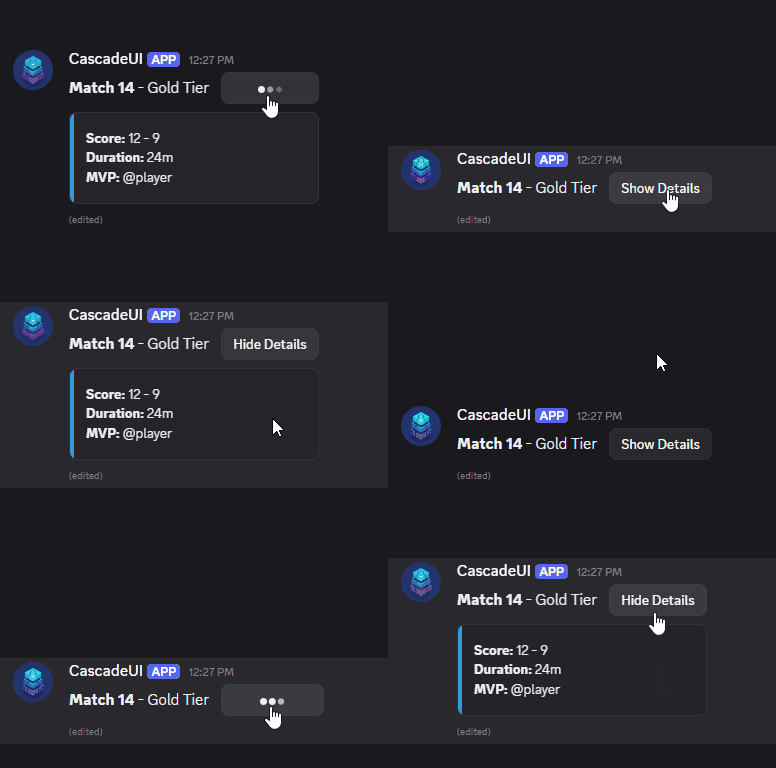
self.details = Collapsible(
    label="Show Details",
    expanded_label="Hide Details",
    summary=lambda: "**Match 14** - Gold Tier",
    reveal=lambda: [card(key_value({"Score": "12 - 9", "Duration": "24m", "MVP": "@player"}))],
    key="match_14",
)

def build_ui(self):
    self.clear_items()
    for item in self.details.render(self):
        self.add_item(item)
V1 Composite Components
V1 only
These use row-based layout and work with StatefulView only.
ConfirmationButtons, PaginationControls, ToggleGroup, ProgressBar --
pre-built V1 component groups that attach to a view via .add_to_view().
See cascadeui.components.patterns.v1 for the full API.
Utilities
slugify(text)
Converts display strings to safe custom_id fragments: