Examples
Working examples are in the examples/ directory. Each is a discord.py cog that can be loaded into any bot.
V2 Examples
These use the V2 component system (StatefulLayoutView, Containers, Sections, TextDisplay).
v2_hello_world.py
The smallest working CascadeUI view: a per-user counter using state_scope = "user", subscribed_actions = {"SCOPED_UPDATE"}, a one-line state_selector reading the count via StateStore.get_scoped_from, and dispatch_scoped({"count": N}) for writes. Mirrors the Quick Start tutorial as a runnable cog. Open with /hello; the same user sees the same counter across every server that shares the bot.
Command: /hello
v2_dashboard.py
Full V2 builder showcase using TabLayoutView. A Controls tab demonstrates tab_nav inner navigation, button_row, toggle_button, cycle_button, and choice_row; the Modules tab shows a Collapsible reset confirm; the About tab uses link_section links. Also covers action_section, toggle_section, key_value, alert, and instance limiting.
Command: /v2dashboard
v2_settings.py
Full settings menu showcasing most CascadeUI features with V2 components:
- Instance limiting (
instance_limit=1,instance_scope="user_guild") to prevent duplicate panels - Scoped state (
state_scope="user") for per-user settings and (state_scope="user_guild") for per-server display preferences - Navigation stack (push/pop with
rebuild=callback) for hub-and-spoke layout - Theming with a live theme switcher
- Undo/redo for reverting notification preference toggles
- Custom reducer (
SETTINGS_UPDATED) for domain-specific state management with_confirmationwrapper on the Reset All danger button- Cross-view reactivity between V2 settings and V1 settings via shared state keys
Command: /v2settings
v2_form.py
Registration form using FormLayoutView with native text fields, a dropdown select, four built-in validators (min_length, max_length, regex, choices), a typed integer field carrying numeric min_value / max_value constraints, and an async "username already taken" check. Text fields are grouped behind a single "Edit Text Fields" button that opens a Modal.
Command: /v2form
v2_pagination.py
Paginated inventory viewer using PaginatedLayoutView, showing both construction modes against the same data. from_data() chunks an in-memory list up front; from_cursor() fetches one page at a time through an async callable, caching pages in an LRU that protects the page on screen from eviction. Container-based page content with jump controls (first/last, go-to-page modal). Demonstrates auto_exit_button for an Exit button kept through page turns and cache_size bounding the cursor cache, and gives each mode its own view class so the two browsers do not compete for one instance_limit slot.
Commands: /v2pages (eager), /v2cursor (cursor)
v2_library.py
Pagination + drill-down navigation. A category hub (StatefulLayoutView) pushes a paginated CategoryListView per category using await PaginatedLayoutView.from_data(...) and push(instance). nav_inside_container = True wraps page content + nav row in a single Container per page; auto_back_button = True adds a Back button that pops the nav stack and survives page turns. The closest mapping for users coming from @Soheab's CV2 paginator gist.
Command: /v2library
v2_db_navigation.py
Database-backed navigation via on_load(). Views hold a repo handle as a
non-reserved constructor kwarg and define on_load() to fetch rows before
each render. Push and pop re-fetch the destination's source automatically
(reload-on-render), so no rebuild= callback is needed; make_nav_row()
builds the Back plus Exit footer. The row list is paged by a
PaginatedRegion fed from on_load(), so a page turn re-slices against the
current repo data. /tasks_close closes a user's panel from the cog through
current_view, the screen on the message after the user opens a task.
Commands: /tasks (open), /tasks_close (close)
v2_computed.py
Quick poll demonstrating @computed for global memoized values that multiple views share without recalculating. Two @computed values derive vote totals and the current leader; the poll view reads both in build_ui() and displays them alongside the raw vote buttons. Both key their result by guild, which is how a value the whole process shares still answers per guild. Contrast with state_selector (per-view change detection): computed values are global and shared across all views.
Command: /poll
v2_wizard.py
D&D character creator using WizardLayoutView. Six steps (Identity, Class, Abilities, Background, a conditional Destiny step, Review) with per-step validation, cross-step state (class list filters by race, subclass by class, ability points draw from a shared pool), a live character-sheet preview card on every step, and the on_finish method hook. Demonstrates navigation button customization, choice_row segmented choices with race-based language defaults, a toggle_section boolean flag (heroic destiny), and the structured modal inputs: the name modal pairs a TextInput with an optional FileUpload portrait that replaces the preview image (a validator refuses a file that is not an image), and the background modal combines paragraph text with RadioGroup, CheckboxGroup, and Checkbox in one edit-in-place form. A Cancel button added once through _build_extra_items stays on every step.
Command: /v2wizard
v2_persistence.py
A PersistentRolesLayoutView-based role selector panel that survives bot restarts. Categories are rendered as accent-colored containers, with exclusive-mode support (selecting one role in a category auto-removes the others). Running /v2roles again automatically cleans up the previous panel, and /v2roles_move moves the panel to another channel, turning off retire_previous_on_send so the old panel is deleted only after the new one has posted. /v2visits covers the other half of persistence: a per-user visit counter whose state is restored from disk rather than re-derived, so the count survives a restart.
Commands: /v2roles, /v2roles_move, /v2visits
v2_tictactoe.py
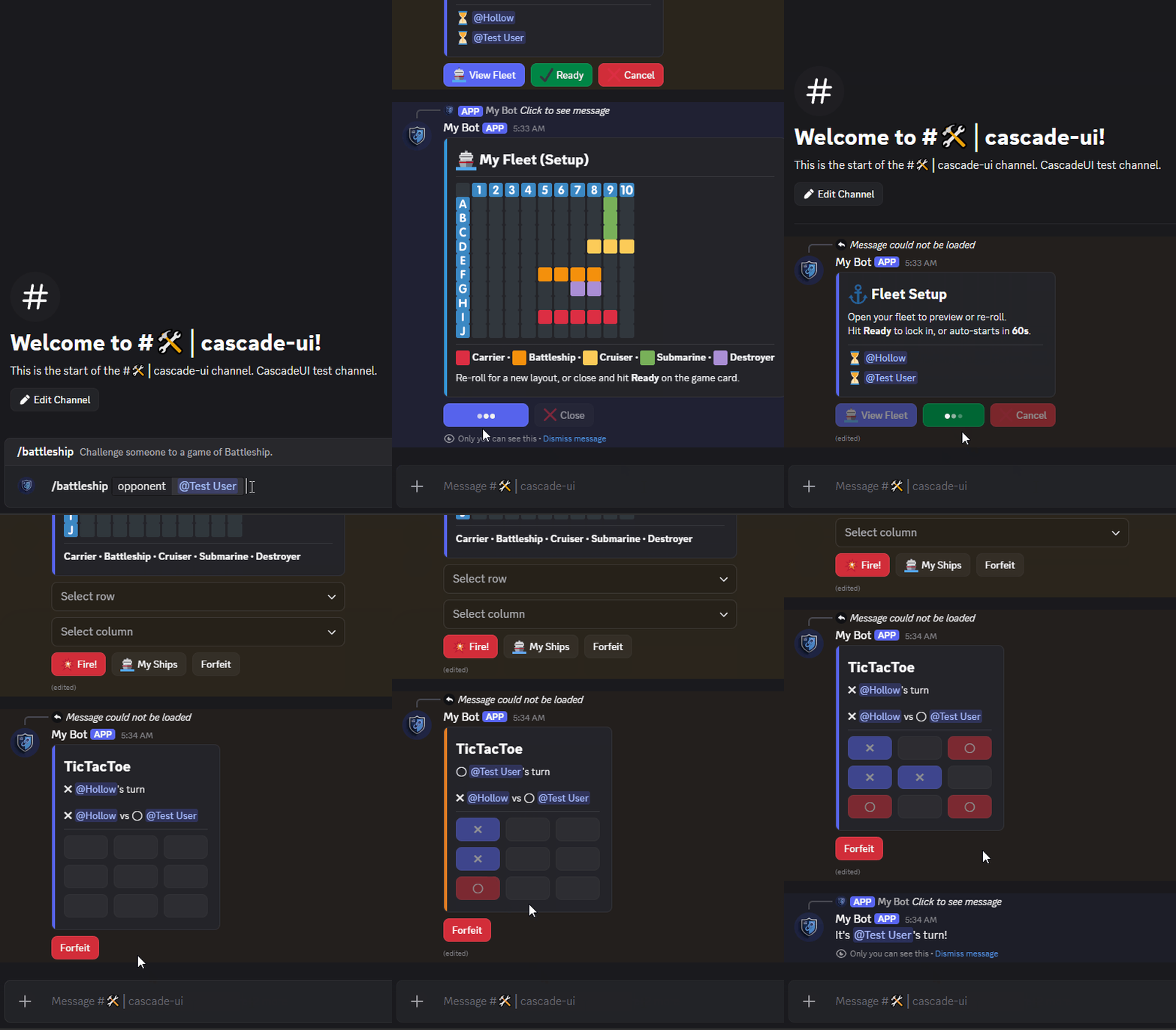
Two-player TicTacToe demonstrating multi-user interaction patterns. Features a challenge acceptance flow (opponent must accept before the game starts), dynamic board size (3x3 to 5x5), configurable win length (e.g. 3-in-a-row on a 5x5 board), Discord mentions, mutual rematch agreement (both players must confirm), forfeit tracking, and participant-aware instance limiting via auto_register_participants and instance_policy = "reject", so a player already in a game is refused a second one rather than losing the first. Each callback checks the game's phase first, so a click queued behind the deciding move changes nothing. Uses allowed_users to restrict interaction to the two players; per-player lifetime stats are written to scoped state via SCOPED_UPDATE and grouped into a server ranking by a @computed selector (no custom reducer). The finished board freezes on Close (exit_policy = "disable"), matching Battleship. /tictactoe leaderboard renders the ranking on a Section-mode LeaderboardLayoutView with avatar thumbnails and an Overview stats card.
Commands: /tictactoe play @user [size] [win], /tictactoe stats [user], /tictactoe leaderboard
v2_lobby.py
Open-join multi-user lobby demonstrating participant_limit with V2 components. Up to 8 players join via a button -- no pre-set allowed_users. Features host-vs-participant authority (only the host can Start Game or Disband), live participant card refresh, register_participant bool-return contract, unregister_participant for the Leave path, and a custom on_participant_limit override with personalized rejection messages.
Command: /lobby
v2_grids.py
Display-only showcase for the grid helpers (emoji_grid() and button_grid()). Demonstrates grid construction from slash-command arguments, axis label presets, cell mutation, and fill_rect() -- all without surrounding game logic. /grid_gallery renders eight variations across three messages for comparison, and /image_gallery covers the media side (MediaGallery plus a Thumbnail Section built from avatars). For interactive grid usage, see v2_battleship.py and v2_tictactoe.py.
Commands: /emoji_grid, /button_grid, /grid_gallery, /image_gallery
v2_attachments.py
Display-only showcase for the V2 media builders (gallery(), image_section(), file_attachment()) with local file uploads. Demonstrates the MediaInput union and the rule that the reference and the bytes travel separately: the builder emits an attachment://<filename> reference into the tree, while the matching discord.File rides along via send(files=[...]) or refresh(attachments=[...]). Sending one without the other renders an unresolved placeholder, which /attach_swap shows being corrected in place.
Commands: /attach_gallery, /attach_section, /attach_download, /attach_swap
v2_battleship.py
Two-player 10x10 Battleship with a standard fleet, text-rendered emoji grids, a fleet setup phase where each player re-rolls their own fleet and readies up, ephemeral private fleet panels attached with parent= and closed with exit_children() when the game ends, and turn-based select targeting. Each callback checks the game's phase first, so a click queued behind a finished game or a started one changes nothing. Demonstrates auto_register_participants, the ephemeral interaction-bound constraint, and live cross-view reactivity (Re-Roll dispatches update both the ephemeral and the public ready card via the standard subscriber pipeline). A phase-aware exit() override deletes an abandoned setup but freezes the finished board as a record. /battleship leaderboard renders server rankings on a Section-mode LeaderboardLayoutView with avatar thumbnails and an Overview stats card.
Commands: /battleship play @user, /battleship stats [user], /battleship leaderboard
v2_leaderboard.py
Server leaderboard built on LeaderboardLayoutView in Section render mode: overrides format_secondary for two-line rows with inline win-rate bars, passes bot= so the library's default get_avatar_url resolves avatar thumbnails, and overrides build_header for an Overview stats card (with the guild icon on its heading, computed from ranked_entries). leaderboard_top_n=25 with leaderboard_per_page=5 produces five-page navigation. The cog inspects bot.intents.members and the guild cache: real members take the available slots when present and synthetic Demo Player rows fill the rest, so the display always renders exactly 25 entries regardless of guild size or intent configuration. The assembled board ranks by MMR, so the two kinds interleave. Stats are derived deterministically from member ID via random.Random(member_id), so repeat invocations return a stable ranking without a persistence layer. Contrast with v2_battleship.py, which feeds the same view class from live computed state -- the tuple shape fed into the pattern is identical, the data source differs.
Command: /leaderboard
V1 Examples (Classic)
These use the V1 component system (StatefulView, embeds, row-based layout).
settings_menu.py
Advanced settings menu retained as the legacy V1 demonstration. Showcases instance limiting, scoped state, push/pop navigation, theming, undo/redo, state selectors, batched dispatch, and a custom reducer. The V1 counterpart to v2_settings.py -- both share the same state keys for cross-view reactivity.
Command: /settings
navigation.py
Navigation stack with push/pop between multi-level views and session data sharing. A dark mode toggle in the settings view writes to shared_data, which the nested view reads without any constructor kwargs. Demonstrates update_session(), shared_data, and SESSION_UPDATED subscriptions alongside multi-level push/pop, and a Start Over button that uses replace() to post a fresh menu with no Back history.
Command: /navtest
V1 primitive coverage
FormView, Modal with validators, PaginatedView.from_data, and
with_loading_state remain fully supported in V1 but no longer ship
with a dedicated example file. See the API reference
for usage. Their V2 equivalents (FormLayoutView, V2 wizard modal
pattern, PaginatedLayoutView) are demonstrated in the V2 examples above.
Running the Examples
- Create a bot on the Discord Developer Portal
- Install CascadeUI:
pip install pycascadeui[sqlite] - Load the example cogs in your bot:
from cascadeui import PersistenceMiddleware, UndoMiddleware, setup_middleware
from cascadeui.persistence import SQLiteBackend

class MyBot(commands.Bot):
    async def setup_hook(self):
        # V2 examples
        await self.load_extension("examples.v2_hello_world")
        await self.load_extension("examples.v2_dashboard")
        await self.load_extension("examples.v2_settings")
        await self.load_extension("examples.v2_form")
        await self.load_extension("examples.v2_pagination")
        await self.load_extension("examples.v2_library")
        await self.load_extension("examples.v2_db_navigation")
        await self.load_extension("examples.v2_wizard")
        await self.load_extension("examples.v2_persistence")
        await self.load_extension("examples.v2_computed")
        await self.load_extension("examples.v2_tictactoe")
        await self.load_extension("examples.v2_battleship")
        await self.load_extension("examples.v2_leaderboard")
        await self.load_extension("examples.v2_attachments")
        await self.load_extension("examples.v2_lobby")
        await self.load_extension("examples.v2_grids")

        # V1 examples (classic API)
        await self.load_extension("examples.settings_menu")
        await self.load_extension("examples.navigation")

        # Install middleware after loading cogs so PersistentView subclasses
        # have registered themselves via __init_subclass__.
        await setup_middleware(
            PersistenceMiddleware(backend=SQLiteBackend("cascadeui.db"), bot=self),
            UndoMiddleware(),  # required by the settings examples
        )
- Run your bot and use the slash commands
Built something with CascadeUI?
The shipped examples are teaching material. For application-level work - real bots, real features, real constraints - check the showcase forum on the official support Discord server. It's where community members post what they built with the library and trade patterns you won't find in the reference examples.